# yesod-job-queue [](https://hackage.haskell.org/package/yesod-job-queue) [](http://stackage.org/lts/package/yesod-job-queue) [](http://stackage.org/nightly/package/yesod-job-queue) [](http://travis-ci.org/nakaji-dayo/yesod-job-queue)
Background jobs library for Yesod.
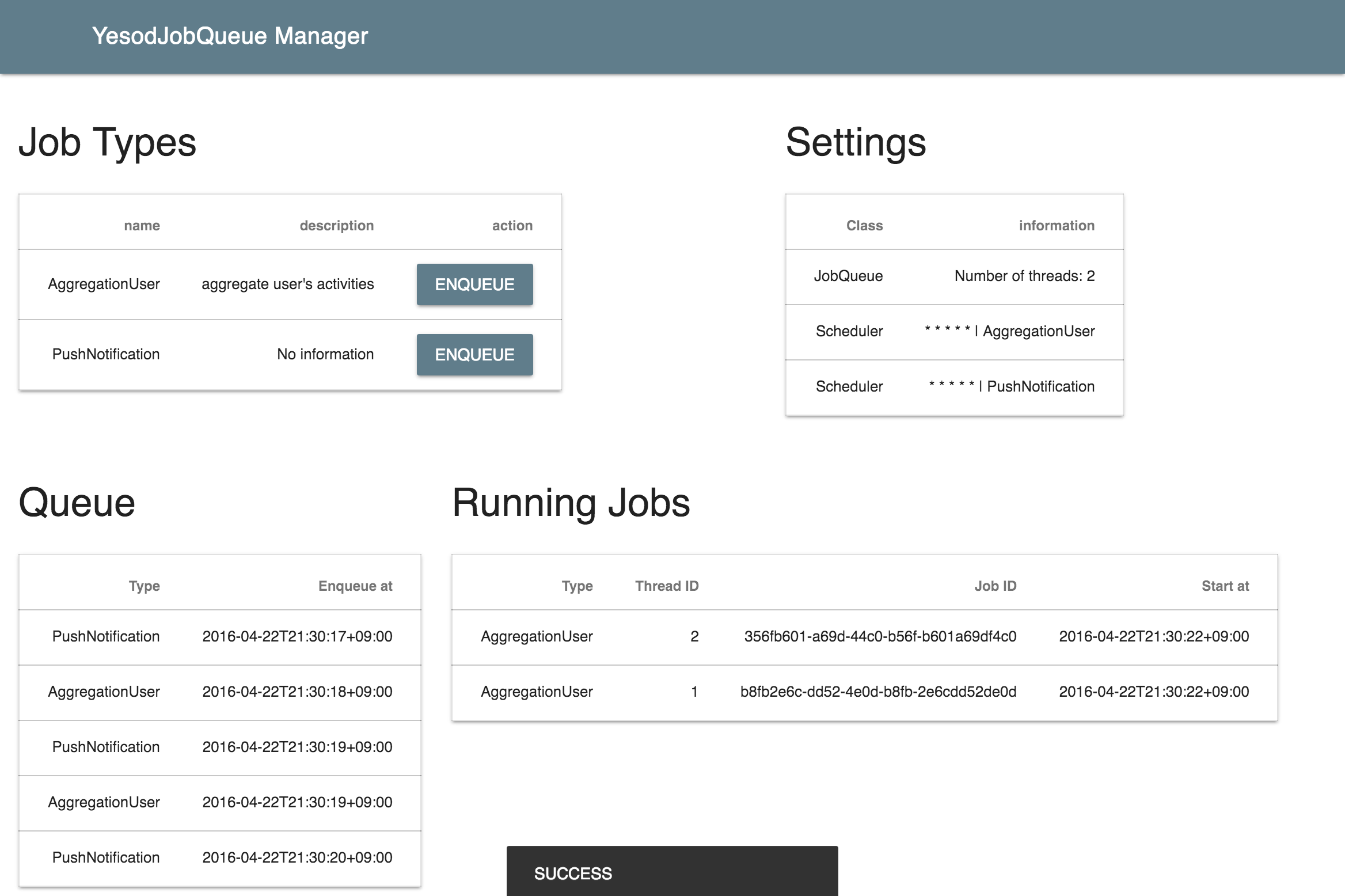
- There are API and Web UI for managing the job.
- Queue backend is Redis.
- Multithreaded.
## Web interface
## Usage
Prepare the JobState to manage the running jobs
``` haskell
import Yesod.JobQueue
data App = App {
appConnPool :: ConnectionPool
, appDBConf :: SqliteConf
, appJobState :: JobState
}
-- e.g. In makeFoundation
main = do
jobState <- newJobState -- create JobState
let app = App pool dbConf jobState
```
Make the routes for API & Manager UI
``` haskell
mkYesod "App" [parseRoutes|
/ HomeR GET
/job JobQueueR JobQueue getJobQueue -- ^ JobQueue API and Manager
|]
```
Define the job. And, to the setting of JobQueue
``` haskell
-- Your job type
data MyJobType = AggregationUser
| PushNotification
| HelloJob String
deriving (Show, Read, Generic)
-- JobQueue settings
instance YesodJobQueue App where
type JobType App = MyJobType
getJobState = appJobState
threadNumber _ = 2
runDBJob action = do -- Required if you use the DB in the job
app <- ask
runSqlPool action $ appConnPool app
-- Your Job code
runJob _ AggregationUser = do
us <- runDBJob $ selectList ([] :: [Filter Person]) []
liftIO $ threadDelay $ 10 * 1000 * 1000
print us
putStrLn "complate job!"
runJob _ PushNotification = do
putStrLn "sent norification!"
runJob _ (HelloJob name) = do
putStrLn . pack $ "Hello " ++ name
```
Please see `example`
### Configration queue backend (Redis)
The default is to connect to `redis localhost:6379`.
And, you can change connect info by [queueConnectInfo](https://hackage.haskell.org/package/yesod-job-queue-0.2.0.1/docs/Yesod-JobQueue.html#v:queueConnectInfo)
## Build package
```
stack build
```
### build javascripts (required when app/* was editted)
```
cd app
npm install
npm run build-js
# need again `stack build`
```
#### developping app/*
You can edit app/app.js without re-build package
```
npm run watch-js ## watch app/*.js for changes, automatically build.
```
```
npm run bs ## serving app.bundle.js at `http://localhost:3001/dist/app.bundle.js` for test
```
in `example/Main.hs`. to use test version of app.bundle.js.
```
jobManagerJSUrl _ = "http://localhost:3001/dist/app.bundle.js"
```
## Run example
```
stack build --flag yesod-job-queue:example && stack exec yesod-job-queue-example
```
You can access Web UI: `http://localhost:3000/job/manager`