# werewolf-slack
[](http://www.repostatus.org/#active)
[](https://travis-ci.org/hjwylde/werewolf-slack)
[](https://github.com/hjwylde/werewolf-slack/releases/latest)
[](https://www.stackage.org/lts/package/werewolf-slack)
[](https://www.stackage.org/nightly/package/werewolf-slack)
A chat interface for playing [werewolf](https://github.com/hjwylde/werewolf) in
[Slack](https://slack.com/).
Werewolf is a well known social party game, commonly also called Mafia.
See the [Wikipedia article](https://en.wikipedia.org/wiki/Mafia_(party_game)) for a rundown on its
gameplay and history.
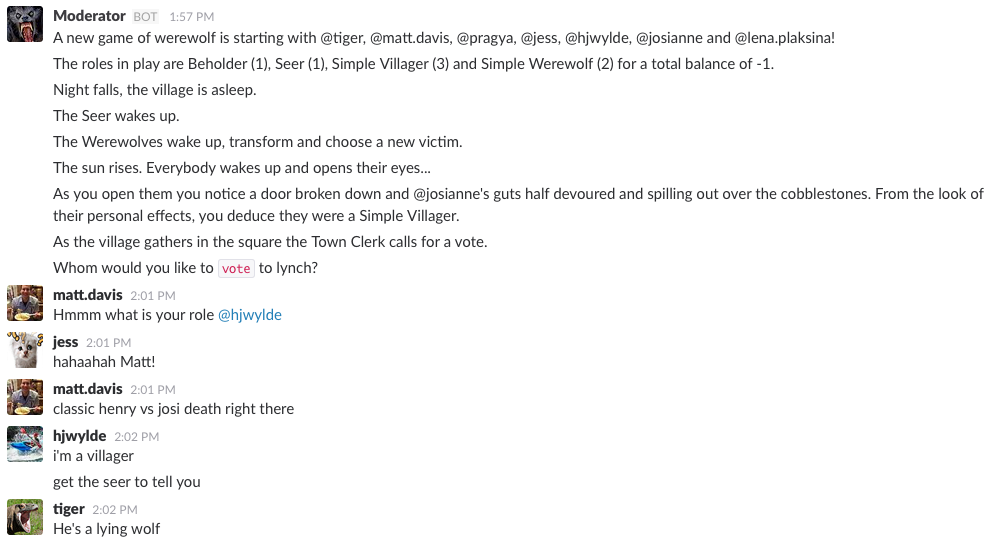
### Game description
Long has the woods been home to wild creatures, both kind and cruel.
Most have faces and are known to the inhabitants of Fougères in Brittany, France; but no-one from
the village has yet to lay eyes on the merciless Werewolf.
Each night Werewolves attack the village and devour the innocent.
For centuries no-one knew how to fight this scourge, however recently a theory has taken ahold that
mayhaps the Werewolves walk among the Villagers themselves...
Objective of the game:
For the Loners: complete their own objective.
For the Villagers: lynch all of the Werewolves.
For the Werewolves: devour all of the Villagers.
### Setup
#### Preparing Slack
Set up an Incoming Webhook [here](https://my.slack.com/services/new/incoming-webhook/).
Make note of the *webhook url*, we'll be using that soon.
Set up a Slash Command (`/werewolf` or similar)
[here](https://my.slack.com/services/new/slash-commands/).
The Slash Command should perform a GET request to the server werewolf-slack is going to be hosted
on.
Make note of the *token* here too.
#### Installing
Installing werewolf-slack is easiest done using either
[Docker](https://www.docker.com/) (recommended),
[stack](https://github.com/commercialhaskell/stack) or
[Cabal](https://github.com/haskell/cabal).
**Using Docker:**
```bash
docker pull hjwylde/werewolf-slack-docker
```
**Using stack:**
```bash
stack install werewolf-slack werewolf
export PATH=$PATH:~/.local/bin
```
**Using Cabal:**
```bash
cabal-install werewolf-slack werewolf
export PATH=$PATH:~/.cabal/bin
```
#### Running
werewolf-slack is a simple web server that listens for events from the Slack Slash Command.
After receiving an event werewolf-slack forwards it on to the werewolf game engine and uses the
Incoming Webhook to send back the response.
Running werewolf-slack is easiest done using either
[Docker](https://www.docker.com/) (recommended) or
the binary itself.
Make sure to add rules to your firewall for werewolf-slack's port.
**With Docker:**
```bash
docker run -d -p 80:80 hjwylde/werewolf-slack-docker -v TOKEN -u WEBHOOK_URL
```
**With werewolf-slack:**
```bash
werewolf-slack -v TOKEN -u WEBHOOK_URL &
```
#### Configuration
It is possible to also configure the port that werewolf-slack listens on. This is done via the
`--port` (`-p`) option.
The default port is *80*.
### Usage
Type `/werewolf help` in your Slack channel to get going!