termonad-0.2.1.0: README.md
Termonad
=========
[](http://travis-ci.org/cdepillabout/termonad)
[](https://hackage.haskell.org/package/termonad)
[](http://stackage.org/lts/package/termonad)
[](http://stackage.org/nightly/package/termonad)

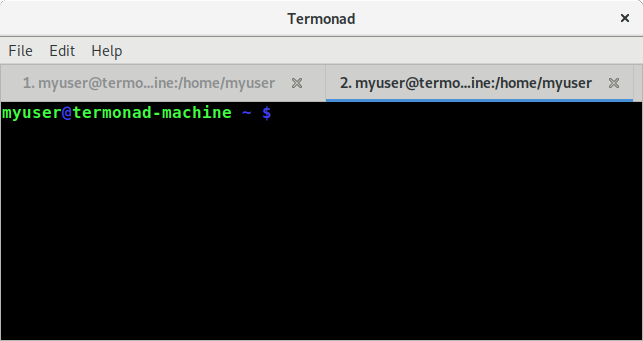
Termonad is a terminal emulator configurable in Haskell. It is extremely
customizable and provides hooks to modify the default behavior. It can be
thought of as the "XMonad" of terminal emulators.
<!-- markdown-toc start - Don't edit this section. Run M-x markdown-toc-refresh-toc -->
**Table of Contents**
- [Termonad](#termonad)
- [Installation](#installation)
- [Arch Linux](#arch-linux)
- [Ubuntu / Debian](#ubuntu--debian)
- [NixOS](#nixos)
- [Mac OS X](#mac-os-x)
- [Windows](#windows)
- [How to use Termonad](#how-to-use-termonad)
- [Configuring Termonad](#configuring-termonad)
- [Compiling Local Settings](#compiling-local-settings)
- [Running with `stack`](#running-with-stack)
- [Running with `nix`](#running-with-nix)
- [Goals](#goals)
- [Contributions](#contributions)
- [Maintainers](#maintainers)
<!-- markdown-toc end -->
## Installation
Termonad can be installed on any system as long as the necessary GTK libraries
are available. The following are instructions for installing Termonad on a few
different distributions and systems. If the given steps don't work for you, or
you want to add instructions for an additional system, please send a pull
request.
The following steps use the
[`stack`](https://docs.haskellstack.org/en/stable/README/) build tool to build
Termonad, but [`cabal`](https://www.haskell.org/cabal/) can be used as well. Steps for
installing `stack` can be found on
[this page](https://docs.haskellstack.org/en/stable/install_and_upgrade/).
### Arch Linux
First, you must install the required GTK system libraries:
```sh
$ pacman -S vte3
```
In order to install Termonad, clone this repository and run `stack install`.
This will install the `termonad` binary to `~/.local/bin/`:
```sh
$ git clone https://github.com/cdepillabout/termonad
$ cd termonad/
$ stack install
```
### Ubuntu / Debian
First, you must install the required GTK system libraries:
```sh
$ apt-get install gobject-introspection libgirepository1.0-dev libgtk-3-dev libvte-2.91-dev
```
In order to install Termonad, clone this repository and run `stack install`.
This will install the `termonad` binary to `~/.local/bin/`:
```sh
$ git clone https://github.com/cdepillabout/termonad
$ cd termonad/
$ stack install
```
### NixOS
There are two methods to build Termonad on NixOS.
The first is using `stack`. The following commands install `stack` for your
user, clone this repository, and install the `termonad` binary to `~/.local/bin/`:
```sh
$ nix-env -i stack
$ git clone https://github.com/cdepillabout/termonad
$ cd termonad/
$ stack --nix install
```
The second is using the normal `nix-build` machinery. The following commands
clone this repository and build the `termonad` binary at `./result/bin/`:
```sh
$ git clone https://github.com/cdepillabout/termonad
$ cd termonad/
$ nix-build
```
### Mac OS X
(*currently no instructions available. please send a PR adding instructions if you get termonad to build.*)
### Windows
(*currently no instructions available. please send a PR adding instructions if you get termonad to build.*)
## How to use Termonad
Termonad is similar to XMonad. The above steps will install a `termonad` binary
somewhere on your system. If you have installed Termonad using `stack`, the
`termonad` binary will be in `~/.local/bin/`. This binary is a version of
Termonad configured with default settings. You can try running it to get an idea
of what Termonad is like:
```sh
$ ~/.local/bin/termonad
```
If you would like to configure termonad with your own settings, first you will
need to create a Haskell file called `~/.config/termonad/termonad.hs`. The
next section gives an example configuration file.
If this file exists, when the `~/.local/bin/termonad` binary launches, it will
try to compile it. If it succeeds, it will create a separate binary file called
something like `~/.cache/termonad/termonad-linux-x86_64`. This binary file can
be thought of as your own personal Termonad, configured with all your own
settings.
When you run `~/.local/bin/termonad`, it will re-exec
`~/.cache/termonad/termonad-linux-x86_64` if it exists.
However, there is one difficulty with this setup. In order for the
`~/.local/bin/termonad` binary to be able to compile your
`~/.config/termonad/termonad.hs` file, it needs to know where GHC is, as well as
where all your Haskell packages live. This presents some difficulties that will
be discussed in a following section.
### Configuring Termonad
The following is an example Termonad configuration file. You should save this to
`~/.config/termonad/termonad.hs`. You can find more information on the available
configuration options within the
[`Termonad.Config`](https://hackage.haskell.org/package/termonad/docs/Termonad-Config.html)
module.
```haskell
{-# LANGUAGE OverloadedStrings #-}
module Main where
import Data.Colour.SRGB (Colour, sRGB24)
import Termonad.App (defaultMain)
import Termonad.Config
( FontConfig, ShowScrollbar(ShowScrollbarAlways), cursorColor
, defaultFontConfig, defaultTMConfig, fontConfig, fontFamily
, fontSize, showScrollbar
)
-- | This sets the color of the cursor in the terminal.
--
-- This uses the "Data.Colour" module to define a dark-red color.
-- There are many default colors defined in "Data.Colour.Names".
cursColor :: Colour Double
cursColor = sRGB24 204 0 0
-- | This defines the font for the terminal.
fontConf :: FontConfig
fontConf =
defaultFontConfig
{ fontFamily = "DejaVu Sans Mono"
, fontSize = 13
}
main :: IO ()
main = do
let termonadConf =
defaultTMConfig
{ cursorColor = cursColor
, fontConfig = fontConf
, showScrollbar = ShowScrollbarAlways
}
defaultMain termonadConf
```
### Compiling Local Settings
If you lauch Termonad by calling `~/.local/bin/termonad`, it will try to
compile the `~/.config/termonad/termonad.hs` file if it exists. The problem is
that `~/.local/bin/termonad` needs to be able to see GHC and the required
Haskell libraries to be able to compile `~/.config/termonad/termonad.hs`.
There are a couple solutions to this problem, listed in the sections below.
(These steps are definitely confusing, and I would love to figure out a better
way to do this. Please submit an issue or PR if you have a good idea about
how to fix this.)
#### Running with `stack`
If you originally compiled Termonad with `stack`, you can use `stack` to
execute Termonad. First, you must change to the directory with the Termonad
source code. From there, you can run `stack exec`:
```sh
$ cd termonad/ # change to the termonad source code directory
$ stack exec -- termonad
```
`stack` will pick up the correct GHC version and libraries from the
`stack.yaml` and `termonad.cabal` file. `termonad` will be run in an
environment with GHC available. `termonad` will use this GHC and libraries to
compile your `~/.config/termonad/termonad.hs` file. It if succeeds, it should
create a `~/.cache/termonad/termonad-linux-x86_64` binary.
If you need extra Haskell libraries available when compiling your
`~/.config/termonad/termonad.hs` file, you can specify them to `stack exec`:
```sh
$ stack exec --package lens --package conduit -- termonad
```
The problem with this is that `stack exec` changes quite a few of your
environment variables. It is not recommended to actually run Termonad from
within `stack exec`. After you run `stack exec -- termonad` and let it
recompile your `~/.config/termonad/termonad.hs` file, exit Termonad.
Re-run Termonad by calling it directly. Termonad will notice that
`~/.config/termonad/termonad.hs` hasn't changed since
`~/.cache/termonad/termonad-linux-x86_64` has been recompiled, so it will
directly execute `~/.cache/termonad/termonad-linux-x86_64`.
#### Running with `nix`
If you originally compiled Termonad with `nix`, you can use `nix` to create
an environment with GHC and specified Haskell libraries available.
There is a `.nix` file available you can use to do this:
[`.nix-helpers/running-termonad.nix`](./.nix-helpers/running-termonad.nix)
This file will give us an environment with `termonad`, GHC, and a few Haskell
libraries installed. You can enter this environment using `nix-shell`:
```sh
$ cd termonad/ # change to the termonad source code directory
$ nix-shell ./.nix-helpers/running-termonad.nix
```
From within this environment, you can run `termonad`. It will find the
`~/.config/termonad/termonad.hs` file and compile it, outputting the
`.cache/termonad/termonad-linux-x86_64` binary. Termonad will then re-exec
this binary.
The problem with this is that `nix-shell` may change your environment variables
in ways you do not want. I recommend running `termonad` to get it to
recompile your `~/.config/termonad/termonad.hs` file, then exit the nix-shell environment and
rerun Termonad by calling it directly. Termonad will notice that
`~/.config/termonad/termonad.hs` hasn't been changed since
`~/.cache/termonad/termonad-linux-x86_64` has been recompiled, so it will
directly execute `~/.cache/termonad/termonad-linux-x86_64`.
## Goals
Termonad has the following goals:
* fully configurable in Haskell
There are already
[many](https://gnometerminator.blogspot.com/p/introduction.html)
[good](https://www.enlightenment.org/about-terminology.md)
[terminal](http://software.schmorp.de/pkg/rxvt-unicode.html)
[emulators](https://launchpad.net/sakura). However, there are no terminal
emulators fully configurable in Haskell. Termonad fills this niche.
* flexible
Most people only need a terminal emulator that lets you change the font-size,
cursor color, etc. They don't need tons of configuration options.
Termonad should be for people that like lots of configuration options.
Termonad should provide many hooks to allow the user to change it's behavior.
* stable
Termonad should be able to be used as everyday as your main terminal
emulator. It should not crash for any reason. If you experience a crash,
please file an issue or a pull request!
* good documentation
The [documentation](https://hackage.haskell.org/package/termonad) for
Termonad on Hackage should be good. You shouldn't have to guess at what
certain data types or functions do. If you have a hard time understanding
anything in the documentation, please submit an issue or PR.
## Contributions
Contributions are highly appreciated. Termonad is currently missing many
helpful configuration options and behavior hooks. If there is something you
would like to add, please submit an issue or PR.
## Maintainers
- [Dennis Gosnell](https://github.com/cdepillabout)