tasty-0.12.0.1: README.md
# Tasty
**Tasty** is a modern testing framework for Haskell.
It lets you combine your unit tests, golden tests, QuickCheck/SmallCheck
properties, and any other types of tests into a single test suite.
Features:
* Run tests in parallel but report results in a deterministic order
* Filter the tests to be run using patterns specified on the command line
* Hierarchical, colored display of test results
* Reporting of test statistics
* Acquire and release resources (sockets, temporary files etc.) that can be
shared among several tests
* Extensibility: add your own test providers and ingredients (runners) above and
beyond those provided
To find out what's new, read the **[change log][]**.
[change log]: https://github.com/feuerbach/tasty/blob/master/core/CHANGELOG.md
## Example
Here's how your `test.hs` might look like:
```haskell
import Test.Tasty
import Test.Tasty.SmallCheck as SC
import Test.Tasty.QuickCheck as QC
import Test.Tasty.HUnit
import Data.List
import Data.Ord
main = defaultMain tests
tests :: TestTree
tests = testGroup "Tests" [properties, unitTests]
properties :: TestTree
properties = testGroup "Properties" [scProps, qcProps]
scProps = testGroup "(checked by SmallCheck)"
[ SC.testProperty "sort == sort . reverse" $
\list -> sort (list :: [Int]) == sort (reverse list)
, SC.testProperty "Fermat's little theorem" $
\x -> ((x :: Integer)^7 - x) `mod` 7 == 0
-- the following property does not hold
, SC.testProperty "Fermat's last theorem" $
\x y z n ->
(n :: Integer) >= 3 SC.==> x^n + y^n /= (z^n :: Integer)
]
qcProps = testGroup "(checked by QuickCheck)"
[ QC.testProperty "sort == sort . reverse" $
\list -> sort (list :: [Int]) == sort (reverse list)
, QC.testProperty "Fermat's little theorem" $
\x -> ((x :: Integer)^7 - x) `mod` 7 == 0
-- the following property does not hold
, QC.testProperty "Fermat's last theorem" $
\x y z n ->
(n :: Integer) >= 3 QC.==> x^n + y^n /= (z^n :: Integer)
]
unitTests = testGroup "Unit tests"
[ testCase "List comparison (different length)" $
[1, 2, 3] `compare` [1,2] @?= GT
-- the following test does not hold
, testCase "List comparison (same length)" $
[1, 2, 3] `compare` [1,2,2] @?= LT
]
```
And here is the output of the above program:
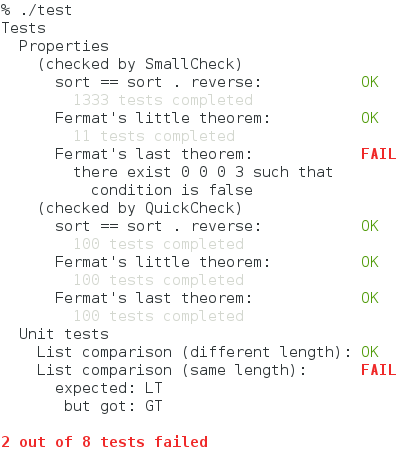
(Note that whether QuickCheck finds a counterexample to the third property is
determined by chance.)
## Packages
[tasty][] is the core package. It contains basic definitions and APIs and a
console runner.
[tasty]: http://hackage.haskell.org/package/tasty
In order to create a test suite, you also need to install one or more «providers» (see
below).
### Providers
The following providers exist:
* [tasty-hunit](http://hackage.haskell.org/package/tasty-hunit) — for unit tests
(based on [HUnit](http://hackage.haskell.org/package/HUnit))
* [tasty-golden][] — for golden
tests, which are unit tests whose results are kept in files
* [tasty-smallcheck](http://hackage.haskell.org/package/tasty-smallcheck) —
exhaustive property-based testing
(based on [smallcheck](http://hackage.haskell.org/package/smallcheck))
* [tasty-quickcheck](http://hackage.haskell.org/package/tasty-quickcheck) — for randomized
property-based testing (based on [QuickCheck](http://hackage.haskell.org/package/QuickCheck))
* [tasty-hedgehog](https://github.com/qfpl/tasty-hedgehog) — for randomized
property-based testing (based on [Hedgehog](http://hackage.haskell.org/package/hedgehog))
* [tasty-hspec](http://hackage.haskell.org/package/tasty-hspec) — for
[Hspec](http://hspec.github.io/) tests
* [tasty-program](http://hackage.haskell.org/package/tasty-program) — run
external program and test whether it terminates successfully
[tasty-golden]: http://hackage.haskell.org/package/tasty-golden
It's easy to create custom providers using the API from `Test.Tasty.Providers`.
### Ingredients
Ingredients represent different actions that you can perform on your test suite.
One obvious ingredient that you want to include is one that runs tests and
reports the progress and results.
Another standard ingredient is one that simply prints the names of all tests.
It is possible to write custom ingredients using the API from `Test.Tasty.Runners`.
Some ingredients that can enhance your test suite are:
* [tasty-ant-xml](http://hackage.haskell.org/package/tasty-ant-xml) adds a
possibility to write the test results in a machine-readable XML format, which
is understood by various CI systems and IDEs
* [tasty-rerun](http://hackage.haskell.org/package/tasty-rerun) adds support for
minimal test reruns by recording previous test runs and using this information
to filter the test tree. For example, you can use this ingredient to only run
failed tests, or only run tests that threw an exception.
* [tasty-html](http://hackage.haskell.org/package/tasty-html) adds the
possibility to write the test results as a HTML file
* [tasty-stats](http://hackage.haskell.org/package/tasty-stats) adds the
possibility to collect statistics of the test suite in a CSV file.
### Other packages
* [tasty-th](http://hackage.haskell.org/package/tasty-th) automatically
discovers tests based on the function names and generate the boilerplate code for
you
* [tasty-hunit-adapter](http://hackage.haskell.org/package/tasty-hunit-adapter)
converts existing HUnit test suites into tasty test suites
* [tasty-discover](https://github.com/lwm/tasty-discover) automatically discovers
your tests.
* [tasty-expected-failure](https://github.com/nomeata/tasty-expected-failure) provides
test markers for when you expect failures or wish to ignore tests.
## Options
Options allow one to customize the run-time behavior of the test suite, such
as:
* mode of operation (run tests, list tests, run tests quietly etc.)
* which tests are run (see «Patterns» below)
* parameters of individual providers (like depth of search for SmallCheck)
### Setting options
There are two main ways to set options:
#### Runtime
When using the standard console runner, the options can be passed on the
command line or via environment variables. To see the available options, run
your test suite with the `--help` flag. The output will look something like this
(depending on which ingredients and providers the test suite uses):
```
% ./test --help
Mmm... tasty test suite
Usage: test [-p|--pattern ARG] [-t|--timeout ARG] [-l|--list-tests]
[-j|--num-threads ARG] [-q|--quiet] [--hide-successes] [--color ARG]
[--quickcheck-tests ARG] [--quickcheck-replay ARG]
[--quickcheck-show-replay ARG] [--quickcheck-max-size ARG]
[--quickcheck-max-ratio ARG] [--quickcheck-verbose]
[--smallcheck-depth ARG]
Available options:
-h,--help Show this help text
-p,--pattern ARG Select only tests that match pattern
-t,--timeout ARG Timeout for individual tests (suffixes: ms,s,m,h;
default: s)
-l,--list-tests Do not run the tests; just print their names
-j,--num-threads ARG Number of threads to use for tests execution
-q,--quiet Do not produce any output; indicate success only by
the exit code
--hide-successes Do not print tests that passed successfully
--color ARG When to use colored output. Options are 'never',
'always' and 'auto' (default: 'auto')
--quickcheck-tests ARG Number of test cases for QuickCheck to generate
--quickcheck-replay ARG Replay token to use for replaying a previous test run
--quickcheck-show-replay ARG
Show a replay token for replaying tests
--quickcheck-max-size ARG
Size of the biggest test cases quickcheck generates
--quickcheck-max-ratio ARG
Maximum number of discared tests per successful test
before giving up
--quickcheck-verbose Show the generated test cases
--smallcheck-depth ARG Depth to use for smallcheck tests
```
Every option can be passed via environment. To obtain the environment variable
name from the option name, replace hyphens `-` with underscores `_`, capitalize
all letters, and prepend `TASTY_`. For example, the environment equivalent of
`--smallcheck-depth` is `TASTY_SMALLCHECK_DEPTH`. To turn on a switch (such as
`TASTY_HIDE_SUCCESSES`), set the variable to `True`.
If you're using a non-console runner, please refer to its documentation to find
out how to configure options during the run time.
#### Compile-time
You can also specify options in the test suite itself, using
`localOption`. It can be applied not only to the whole test tree, but also to
individual tests or subgroups, so that different tests can be run with
different options.
It is possible to combine run-time and compile-time options, too, by using
`adjustOption`. For example, make the overall testing depth configurable
during the run time, but increase or decrease it slightly for individual
tests.
This method currently doesn't work for ingredient options, such as `--quiet` or
`--num-threads`. You can set them by setting the corresponding environment
variable before calling `defaultMain`:
<a id="num_threads_example">
```haskell
import Test.Tasty
import System.Environment
main = do
setEnv "TASTY_NUM_THREADS" "1"
defaultMain _
```
### Patterns
It is possible to restrict the set of executed tests using the `--pattern`
option. The syntax of patterns is the same as for test-framework, namely:
- An optional prefixed bang `!` negates the pattern.
- If the pattern ends with a slash, it is removed for the purpose of
the following description, but it would only find a match with a
test group. In other words, `foo/` will match a group called `foo`
and any tests underneath it, but will not match a regular test
`foo`.
- If the pattern does not contain a slash `/`, the framework checks
for a match against any single component of the path.
- Otherwise, the pattern is treated as a glob, where:
- The wildcard `*` matches anything within a single path component
(i.e. `foo` but not `foo/bar`).
- Two wildcards `**` matches anything (i.e. `foo` and `foo/bar`).
- Anything else matches exactly that text in the path (i.e. `foo`
would only match a component of the test path called `foo` (or a
substring of that form).
For example, `group/*1` matches `group/test1` but not
`group/subgroup/test1`, whereas both examples would be matched by
`group/**1`. A leading slash matches the beginning of the test path; for
example, `/test*` matches `test1` but not `group/test1`.
### Running tests in parallel
In order to run tests in parallel, you have to do the following:
* Compile (or, more precisely, *link*) your test program with the `-threaded`
flag;
* Launch the program with `+RTS -N -RTS`.
### Timeout
To apply timeout to individual tests, use the `--timeout` (or `-t`) command-line
option, or set the option in your test suite using the `mkTimeout` function.
Timeouts can be fractional, and can be optionally followed by a suffix `ms`
(milliseconds), `s` (seconds), `m` (minutes), or `h` (hours). When there's no
suffix, seconds are assumed.
Example:
./test --timeout=0.5m
sets a 30 seconds timeout for each individual test.
### Options controlling console output
The following options control behavior of the standard console interface:
<dl>
<dt><code>-q,--quiet</code></dt>
<dd>
Run the tests but don't output anything. The result is indicated only by the
exit code, which is 1 if at least one test has failed, and 0 if all tests
have passed. Execution stops when the first failure is detected, so not all
tests are necessarily run.
This may be useful for various batch systems, such as commit hooks.
</dd>
<dt><code>--hide-successes</code></dt>
<dd>Report only the tests that has failed. Especially useful when the
number of tests is large.</dd>
<dt><code>-l,--list-tests</code></dt>
<dd>Don't run the tests; only list their names, in the format accepted by
<code>--pattern</code>.</dd>
<dt><code>--color</code></dt>
<dd>Whether to produce colorful output. Accepted values: <code>never</code>,
<code>always</code>, <code>auto</code>. <code>auto</code> means that colors will
only be enabled when output goes to a terminal and is the default value.</dd>
</dl>
### Custom options
It is possible to add custom options, too.
To do that,
1. Define a datatype to represent the option, and make it an instance of
`IsOption`
2. Register the options with the `includingOptions` ingredient
3. To query the option value, use `askOption`.
See the [Custom options in Tasty][custom-options-article] article for some examples.
## Project organization and integration with Cabal
There may be several ways to organize your project. What follows is not
Tasty's requirements but my recommendations.
### Tests for a library
Place your test suite sources in a dedicated subdirectory (called `tests`
here) instead of putting them among the main library sources.
The directory structure will be as follows:
my-project/
my-project.cabal
src/
...
tests/
test.hs
Mod1.hs
Mod2.hs
...
`test.hs` is where your `main` function is defined. The tests may be
contained in `test.hs` or spread across multiple modules (`Mod1.hs`, `Mod2.hs`,
...) which are then imported by `test.hs`.
Add the following section to the cabal file (`my-project.cabal`):
test-suite test
default-language:
Haskell2010
type:
exitcode-stdio-1.0
hs-source-dirs:
tests
main-is:
test.hs
build-depends:
base >= 4 && < 5
, tasty >= 0.7 -- insert the current version here
, my-project -- depend on the library we're testing
, ...
### Tests for a program
All the above applies, except you can't depend on the library if there's no
library. You have two options:
* Re-organize the project into a library and a program, so that both the
program and the test suite depend on this new library. The library can be
declared in the same cabal file.
* Add your program sources directory to the `Hs-source-dirs`. Note that this
will lead to double compilation (once for the program and once for the test
suite).
## FAQ
1. How do I make some tests execute after others?
Currently, your only option is to make all tests execute sequentially by
setting the number of tasty threads to 1 ([example](#num_threads_example)).
See [#48](https://github.com/feuerbach/tasty/issues/48) for the discussion.
## Press
Blog posts and other publications related to tasty. If you wrote or just found
something not mentioned here, send a pull request!
* [Holy Haskell Project Starter](http://yannesposito.com/Scratch/en/blog/Holy-Haskell-Starter/)
* [First time testing, also with FP Complete](http://levischuck.com/posts/2013-11-13-first-testing-and-fpcomplete.html)
(tasty has been added to stackage since then)
* [24 Days of Hackage: tasty](http://ocharles.org.uk/blog/posts/2013-12-03-24-days-of-hackage-tasty.html)
* [Resources in Tasty](http://ro-che.info/articles/2013-12-10-tasty-resources.html)
* [Custom options in Tasty][custom-options-article]
* [Resources in Tasty (update)](http://ro-che.info/articles/2013-12-29-tasty-resources-2.html)
* [Announcing tasty-rerun](http://ocharles.org.uk/blog/posts/2014-01-20-announcing-tasty-rerun.html)
* [Code testing in Haskell revisited (with Tasty)](http://lambda.jstolarek.com/2014/01/code-testing-in-haskell-revisited-with-tasty/)
[custom-options-article]: http://ro-che.info/articles/2013-12-20-tasty-custom-options.html
Maintainers
-----------
[Roman Cheplyaka](https://github.com/feuerbach) is the primary maintainer.
[Oliver Charles](https://github.com/ocharles) is the backup maintainer. Please
get in touch with him if the primary maintainer cannot be reached.