slate-0.13.0.0: README.md
# slate - a note taking tool.
A simple tool to take notes from your terminal (and sync them between your devices).
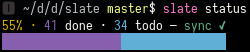
Generates markdown [task lists](https://help.github.com/articles/about-task-lists/).
**Table of contents**
- [Install](#install)
- [Basic usage](#basic-usage)
- [Configuration](#configuration)
- [Callbacks](#callbacks)
- [sync](#sync)
- [status](#status)
- [Autocompletion](#autocompletion)
## Install
You can install it using [stack](https://docs.haskellstack.org/) (requires stack >= 1.6).
```shell
$ stack install slate
```
## Basic usage
<pre>
$ slate --help
slate - a note taking tool.
Usage: slate COMMAND
Slate
Available options:
-h,--help Show this help text
Available commands:
add Add a note.
done Mark a note as done when given a note ID, display
done notes otherwise.
todo Mark a note as todo when given a note ID, display
todo notes otherwise.
doing Toggle highlighting on a note when given a note ID,
display notes marked as doing otherwise.
remove Remove a note.
display Display a slate.
rename Rename a slate.
wipe Wipe a slate.
status Display the status of a slate.
sync Sync every slate.
$ slate add "My *first* note."
$ slate add "New note!"
$ slate display
0 - My <b>first</b> note.
1 - New note!
$ slate done 0
$ slate display
<s>0 - My <b>first</b> note.</s>
1 - New note!
$ slate display --only=todo # or just slate todo
1 - New note!
$ slate status
1 done, 1 todo (2 total).
50% · 1 done · 1 todo — sync ✔
▮▮▮▮▮▮▮▮▮▮▮▮▮▮▮▯▯▯▯▯▯▯▯▯▯▯▯▯▯▯
$ slate add "Fake note"
$ slate display
<s>0 - My <b>first</b> note.</s>
1 - New note!
2 - Fake note
$ slate remove 2
$ slate display
<s>0 - My <b>first</b> note.</s>
1 - New note!
$ slate wipe --only=todo
$ slate display
<s>0 - My <b>first</b> note.</s>
$ slate todo 0
$ slate display
0 - My <b>first</b> note.
</pre>
Lists are stored in `~/.config/slate/` and their default name is the name of your current directory. You can use any other name you want using the `--name` option or by adding a `.slate` file containing the name you want to use.
## Configuration
The following configuration options can be set in `~/.config/slate/config.toml` (you'll have to create this file).
You can check out [config.example.toml](https://github.com/evuez/slate/blob/master/config.example.toml) for a configuration example.
### Callbacks
You must define the commands in this section in a `[callbacks]` table:
```
[callbacks]
key1 = value1
key2 = value2
...
```
#### sync
You can use `slate sync` to synchronize your slates. There's no default configuration for this command, so for it to work you'll have to add your own sync command, for example:
```toml
sync = "git add . && git commit -m 'Update slates'; git pull --rebase origin master && git push origin master"
```
This would stage & commit every updates in `~/.config/slate/`, update your local copy and push your updates to the `origin` remote.
#### status
By default, `slate status` only displays the number of notes by status. You can add a command in the `status` key that'll be used to check if the slate is synchronized or not, for example:
```toml
status = "git diff --exit-code $SLATE"
```
Where `$SLATE` will be set to `~/.config/slate/<slate name>.md`. The command must return a non-zero exit code if the slate is out of sync and zero if it's synced.
## Autocompletion
You can use the following commands to generate a completion script for your shell:
- Bash: `slate --bash-completion-script $(which slate)`
- Zsh: `slate --zsh-completion-script $(which slate)`
- Fish: `slate --fish-completion-script (which slate)`