sdr-0.1.0.14: Readme.md
# SDR
A Software Defined Radio library written in Haskell
See the [blog post](https://adamwalker.github.io/Introducing-SDR/).
# Features
* Write software defined radio applications in Haskell
* Signal processing blocks can be chained together using the [Pipes](https://hackage.haskell.org/package/pipes) library
* Zero copy design
* Signal processing functions are implemented in both Haskell and C:
* Optimised C implementations of signal processing functions that utilise SIMD instructions
* Performance of Haskell signal processing functions within a factor of 2 of C (without SIMD) thanks to the vector library, stream fusion and ghc's LLVM backend
* Can filter, decimate and resample
* Helper functions for FIR filter design using window functions and plotting of the frequency response
* FFTs using [FFTW](http://www.fftw.org)
* Line and waterfall plots using OpenGL
* FM demodulation
* PulseAudio sound sink
* [rtl-sdr](http://sdr.osmocom.org/trac/wiki/rtl-sdr) and [BladeRF](https://nuand.com/) based radio sources/sinks supported and other sources are easily added
* Extensive benchmark and test suites of signal processing functions
See [sdr-apps](https://github.com/adamwalker/sdr-apps) for a collection of simple apps built on the library, [sdr-demo](https://github.com/adamwalker/sdr-demo) for a demo application and [bladerf-sdr-apps](https://github.com/adamwalker/bladerf-sdr-apps) to get started with the BladeRF.
# Screenshot
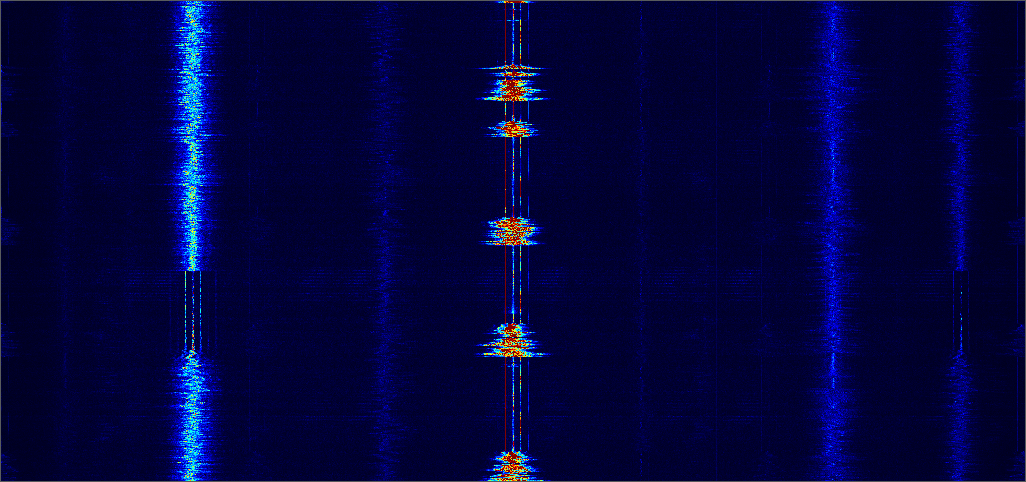
A chunk of the FM broadcast spectrum. Captured with an RTLSDR device and drawn as a waterfall using the [Plot](https://github.com/adamwalker/sdr/blob/master/hs_sources/SDR/Plot.hs) module.
# Getting Started
## Installation
This library will only build and run on 64 bit x86 Linux systems.
You can install it from [Hackage](https://hackage.haskell.org/package/sdr):
```
cabal install sdr
```
If you want to use the BladeRF, you will also need [bladerf-pipes](https://github.com/adamwalker/bladerf-pipes) and [hlibBladeRF](https://github.com/victoredwardocallaghan/hlibBladeRF).
## Example Applications
A collection of simple apps can be found [here](https://github.com/adamwalker/sdr-apps). These include an FM radio receiver, an OpenGL waterfall plotter and an AM radio receiver that can be used to listen to [Airband](https://en.wikipedia.org/wiki/Airband).
Clone and build:
```
git clone https://github.com/adamwalker/sdr-apps
cd sdr-apps
cabal install
```
To run the FM receiver:
(Assuming cabal-built binaries are in your path)
```
fm -f <your favourite station, e.g. 90.2M>
```
To run the waterfall plot:
```
waterfall -f <center frequency, e.g. 90.2M> -r <sample rate, e.g. 1280M>
```
To run the AM receiver:
```
am -f <center frequency, e.g. 124.4M>
```
# Usage
Documentation is available on [Hackage](https://hackage.haskell.org/package/sdr).
An FM receiver:
```haskell
import Control.Monad.Trans.Either
import Data.Vector.Generic as VG
import Pipes
import qualified Pipes.Prelude as P
import SDR.Filter
import SDR.RTLSDRStream
import SDR.Util
import SDR.Demod
import SDR.Pulse
import SDR.CPUID
--The filter coefficients are stored in another module
import Coeffs
samples = 8192
frequency = 105700000
main = eitherT putStrLn return $ do
info <- lift getCPUInfo
str <- sdrStream (defaultRTLSDRParams frequency 1280000) 1 (fromIntegral samples * 2)
lift $ do
sink <- pulseAudioSink
deci <- fastDecimatorC info 8 coeffsRFDecim
resp <- fastResamplerR info 3 10 coeffsAudioResampler
filt <- fastFilterSymR info coeffsAudioFilter
runEffect $ str
>-> P.map (interleavedIQUnsignedByteToFloatFast info)
>-> firDecimator deci samples
>-> fmDemod
>-> firResampler resp samples
>-> firFilter filt samples
>-> P.map (VG.map (* 0.2))
>-> sink
```
# Disclaimer
I started this project to learn about signal processing. I still have no idea what I'm doing.
Only tested on Arch Linux.
If you actually use this library for anything, let me know: adamwalker10@gmail.com