# Proof Assistant Bot
1. [Description](#descriprion)
2. [Installation](#installation)
1. [Coq](#coq)
2. [Agda](#agda)
3. [Idris 2](#idris-2)
4. [Lean](#lean)
5. [Arend](#arend)
6. [Rzk](#rzk)
7. [Alloy](#alloy)
3. [Usage](#usage)
4. [Available instances](#available-instances)
5. [Acknowledgements](#acknowledgements)
## Description
This bot provides limited Telegram interfaces to following proof assistant programs (in order of implementation):
- Coq
- Agda
- Idris 2
- Lean
- Arend
- Rzk
## Installation
1. Bot could be built via following commands:
```bash
cabal update
cabal build
cabal install --overwrite-policy=always
```
2. To launch bot you need to set environmental variables, see `./config/settings.dhall` for more details.
One of them is `PROOF_ASSISTANT_BOT_TOKEN`. Obtain it via `@BotFather` and set it:
```
export PROOF_ASSISTANT_BOT_TOKEN="..."
```
3. Another environmental variable that unfortunately needed is `NIX_PROFILE`. Please add it as
```
export NIX_PROFILE="$HOME/.nix-profile"
```
### Coq
1. Install `opam >= 2.1.0`, e.g. [from here](https://ocaml.org/docs/up-and-running#installation-for-unix).
```bash
cd $HOME
opam --version
2.1.3
```
2. Install `Coq`.
```bash
cd $HOME
opam init
eval $(opam env)
opam pin add coq 8.16.1
```
3. Locate `coqtop` and set enviromental variable. Should be similar to:
```
export COQ_BIN_PATH="$HOME/.opam/default/bin/coqtop"
```
### Agda
We do not need to worry about `Agda` since it is included in package dependencies. It will be installed automatically. Meantime, Agda standard library should be installed manually.
1. Get `agda-stdlib` from [Github](https://github.com/agda/agda-stdlib/releases/tag/v1.7.1).
2. Unpack archive.
```
mkdir -p $PROOF_ASSISTANT_BOT_DIR/agda
cp agda-stdlib-1.7.1.tar.gz $PROOF_ASSISTANT_BOT_DIR/agda
cd $PROOF_ASSISTANT_BOT_DIR/agda
tar -xzvf agda-stdlib-1.7.1.tar.gz
export AGDA_STDLIB_PATH=$PROOF_ASSISTANT_BOT_DIR/agda/agda-stdlib-1.7.1
```
3. Create file `$HOME/.agda/defaults` with following content:
```
standard-library
```
4. Create file `$HOME/.agda/libraries` with following content:
```
$AGDA_STDLIB_PATH/standard-library.agda-lib
```
### Idris 2
1. Get `nix` from [nixos.org](https://nixos.org/download.html#download-nix).
2. Install `idris2` via `nix`:
```bash
nix-env -i idris2
```
3. Set environmental variable:
```bash
export IDRIS2_BIN_PATH="$HOME/.nix-profile/bin/idris2"
```
### Lean
1. Get `nix` from [nixos.org](https://nixos.org/download.html#download-nix).
2. Install `lean` via `nix`:
```bash
nix-env -i lean
```
3. Install `leanproject` via `nix`:
```bash
nix-env -i mathlibtools
```
4. Run `leanproject new lean`.
5. Set `LEAN_BIN_PATH` environmental variable:
```bash
export LEAN_BIN_PATH="$HOME/.nix-profile/bin/lean"
```
6. Set `LEAN_PROJECT_PATH` to the newly created project directory.
### Arend
1. Get `nix` from [nixos.org](https://nixos.org/download.html#download-nix).
2. Get `java` and `openjdk17` via `nix`:
```bash
nix-env -i openjdk-17.0.4+8
```
3. Set `JAVA_HOME` environment variable to your openjdk location. You can use `readlink $HOME/.nix-profile/bin/java` and strip `/bin/java` from the end.
4. Create project directory to store arend projects (for different Telegram chats)
and set `AREND_ROOT_PROJECT_DIR`.
5. Get Arend standard library from [the official site](https://arend-lang.github.io/download#standard-library) and store in `${AREND_ROOT_PROJECT_DIR}/libs`.
6. Point `AREND_STDLIB_PATH` environment variable to the same location as `AREND_ROOT_PROJECT_DIR`.
7. Download [`Arend.jar`](https://github.com/JetBrains/Arend/releases/latest/download/Arend.jar) and set `AREND_PATH` environment variable to its location, e.g.
```bash
export AREND_PATH="${AREND_ROOT_PROJECT_DIR}/Arend.jar"
```
### Rzk
No actions required. See `cabal.project` for more details.
### Alloy 6 / Alloy CLI Wrapper
You can read about CLI Wrapper here: https://github.com/AlloyTools/org.alloytools.alloy/issues/211
1. Get `nix` from [nixos.org](https://nixos.org/download.html#download-nix).
2. Get `java` and `openjdk17` via `nix`:
```bash
nix-env -i openjdk-17.0.4+8
```
3. Set `JAVA_HOME` environment variable to your openjdk location. You can use `readlink $HOME/.nix-profile/bin/java` and strip `/bin/java` from the end.
4. Get `alloy6` via `nix`:
```bash
nix-env -i alloy6
```
5. Create project directory to store Alloy projects (for different telegram chats) and set `ALLOY_PROJECT_DIR`.
6. Create directory for Alloy CLI wrapper and prepare Alloy CLI Wrapper:
```bash
mkdir -p $ALLOY_PROJECT_DIR/bin
cd $ALLOY_PROJECT_DIR
# Download Alloy CLI Wrapper
curl https://gist.githubusercontent.com/swamp-agr/560f0d9bf8dc034f99d6055a5a197285/raw/5b547616063ba834bfa2987bc1eb539f1ec8088d/Main.java > bin/Main.java
javac -cp "$NIX_PROFILE/share/alloy/*" -Xlint:all bin/Main.java
# Test: should be empty output and exit code 0
java -cp $NIX_PROFILE/share/alloy/alloy6.jar:$ALLOY_PROJECT_DIR/bin Main
```
7. Set up `graphviz` and `imagemagick` for generating plots based on Alloy CLI Wrapper output:
```bash
nix-env -i graphviz imagemagick
```
8. Set `ALLOY_PATH` environment variable to `$NIX_PROFILE/share/alloy/alloy6.jar`.
## Usage
- Coq supports only typecheck of the user input via `/coq` command. Example:
```coq
/coq Inductive day : Type :=
| monday
| tuesday
| wednesday
| thursday
| friday
| saturday
| sunday.
Definition next_weekday (d:day) : day :=
match d with
| monday => tuesday
| tuesday => wednesday
| wednesday => thursday
| thursday => friday
| friday => monday
| saturday => monday
| sunday => monday
end.
Compute (next_weekday friday).
Compute (next_weekday (next_weekday saturday)).
Example test_next_weekday:
(next_weekday (next_weekday saturday)) = tuesday.
Proof. simpl. reflexivity. Qed.
```
- Agda is available via `/agda` command. Bot supports several subcommands for Agda:
- `/agda /load <input>`. E.g.
```agda
/agda /load import Relation.Binary.PropositionalEquality as Eq
open Eq using (_≡_; refl)
open Eq.≡-Reasoning using (begin_; _≡⟨⟩_; _∎)
data ℕ : Set where
zero : ℕ
suc : ℕ → ℕ
{-# BUILTIN NATURAL ℕ #-}
_+_ : ℕ → ℕ → ℕ
zero + n = n
(suc m) + n = suc (m + n)
_ : 2 + 3 ≡ 5
_ =
begin
2 + 3
≡⟨⟩ -- is shorthand for
(suc (suc zero)) + (suc (suc (suc zero)))
≡⟨⟩ -- inductive case
suc ((suc zero) + (suc (suc (suc zero))))
≡⟨⟩ -- inductive case
suc (suc (zero + (suc (suc (suc zero)))))
≡⟨⟩ -- base case
suc (suc (suc (suc (suc zero))))
≡⟨⟩ -- is longhand for
5
∎
```
- `/agda /reload`
- `/agda /typeOf <expr>`. E.g. `/agda /typeOf suc`.
- `/agda <expr>`. E.g. `/agda suc zero + suc zero`.
- Idris 2 via `/idris2` command. Bot supports several subcommands for Idris 2:
- `/idris2 /load <input>`. E.g.
```idris
/idris2 /load module Main
import System.File.ReadWrite
tryPrint : Either FileError String -> IO ()
tryPrint (Left _) = putStrLn "error"
tryPrint (Right r) = putStrLn r
main : IO ()
main = do c <- readFile "hello.idr"
tryPrint c
```
- `/idris2 /typeOf <expr>`. E.g. `/idris2 /typeOf Nat`.
- `/idris2 <expr>`. E.g. `/idris2 2 + 3`.
- Lean is available via `/lean` command. Typecheck supported for the user input. Only several modes were tested (calc mode, conv mode, simplifier).
- Example 1:
```lean
/lean import data.nat.basic
variables (a b c d e : ℕ)
variable h1 : a = b
variable h2 : b = c + 1
variable h3 : c = d
variable h4 : e = 1 + d
theorem T : a = e :=
calc
a = b : h1
... = c + 1 : h2
... = d + 1 : congr_arg _ h3
... = 1 + d : add_comm d (1 : ℕ)
... = e : eq.symm h4
```
- Example 2:
```lean
/lean import topology.basic
#check topological_space
```
- Example 3:
```lean
/lean import algebra.group.defs
variables (G : Type) [group G] (a b c : G)
example : a * a⁻¹ * 1 * b = b * c * c⁻¹ :=
begin
simp
end
```
- Arend is available via `/arend` command. Only typecheck supported.
- Example:
```arend
/arend \func f => 0
```
- Rzk is available via `/rzk` command. Typechecker supported for every language.
- Example:
```rzk
/rzk #lang rzk-1
#def prod : (A : U) -> (B : U) -> U
:= \A -> \B -> ∑ (x : A), B
#def isweq : (A : U) -> (B : U) -> (f : (_ : A) -> B) -> U
:= \A -> \B -> \f ->
∑ (g : (_ : B) -> A),
prod ((x : A) -> g (f x) =_{A} x)
((y : B) -> f (g y) =_{B} y)
#def weq : (A : U) -> (B : U) -> U
:= \A -> \B -> ∑ (f : (_ : A) -> B), isweq A B f
#def Theorem-4.1
: (I : CUBE)
-> (psi : (t : I) -> TOPE)
-> (phi : {(t : I) | psi t} -> TOPE)
-> (X : U)
-> (Y : <{t : I | psi t} -> (x : X) -> U >)
-> (f : <{t : I | phi t} -> (x : X) -> Y t x >)
-> weq <{t : I | psi t} -> (x : X) -> Y t x [phi t |-> f t]>
((x : X) -> <{t : I | psi t} -> Y t x [phi t |-> f t x]>)
:= \I -> \psi -> \phi -> \X -> \Y -> \f ->
(\k -> \x -> \t -> k t x,
(\k -> \{t : I | psi t} -> \x -> (k x) t,
(\k -> refl_{k}, \k -> refl_{k})))
#def Theorem-4.2_uncurry_ext
: (I : CUBE)
-> (J : CUBE)
-> (psi : (t : I) -> TOPE)
-> (zeta : (s : J) -> TOPE)
-> (X : <{t : I | psi t} -> <{s : J | zeta s} -> U> >)
-> (chi : {(t : I) | psi t} -> TOPE)
-> (phi : {(s : J) | zeta s} -> TOPE)
-> (f : <{(t, s) : I * J | psi t /\ zeta s} -> X t s >)
-> (_ : <{t : I | psi t}
-> <{s : J | zeta s}
-> X t s [chi s |-> f (t, s)]>
[phi t |-> \s -> f (t, s)]>)
-> <{(t, s) : I * J | psi t /\ zeta s}
-> X t s [(phi t /\ zeta s) \/ (psi t /\ chi s) |-> f (t, s)]>
:= \I -> \J -> \psi -> \zeta -> \X -> \chi -> \phi -> \f ->
\k -> \(t, s) -> k t s
```
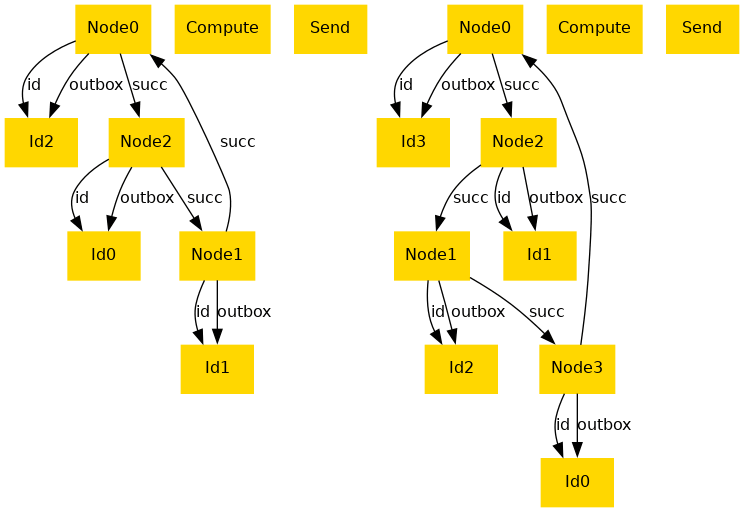
- Alloy is available via `/alloy` command.
- Example:
```alloy
/alloy open util/ordering[Id]
sig Node {
id : one Id,
succ : one Node,
var inbox : set Id,
var outbox : set Id
}
sig Id {}
fact ring {
all i : Id | lone id.i
all n : Node | Node in n.^succ
}
var sig elected in Node {}
fact elected {
always {
elected = {n : Node | once (n.id in n.inbox)}
}
}
enum Event { Send, Compute }
pred send [n : Node] {
some i : n.outbox {
n.outbox' = n.outbox - i
n.succ.inbox' = n.succ.inbox + i
}
all m : Node - n.succ | m.inbox' = m.inbox
all m : Node - n | m.outbox' = m.outbox
}
fun send : Event -> Node {
Send -> { n : Node | send[n] }
}
pred compute [n : Node] {
some i : n.inbox {
n.inbox' = n.inbox - i
n.outbox' = n.outbox + (i - n.id.*(~next))
}
all m : Node - n | m.inbox' = m.inbox
all m : Node - n | m.outbox' = m.outbox
}
fun compute : Event -> Node {
Compute -> { n : Node | compute[n] }
}
fun events : set Event {
(send+compute).Node
}
pred skip {
inbox' = inbox
outbox' = outbox
}
fact init {
no inbox
outbox = id
}
fact behaviour {
always (skip or some n : Node | send[n] or compute[n])
}
run {} for 4 but exactly 4 Node, 10 steps
run example {eventually some elected} for 3 but exactly 3 Node, 6 steps
assert safety {
always lone elected
}
check safety for 3 but 15 steps
pred sendEnabled [n : Node] {
some n.outbox
}
pred computeEnabled [n : Node] {
some n.inbox
}
pred fairness {
always (all n : Node | (always sendEnabled[n] implies eventually send[n]))
always (all n : Node | (always computeEnabled[n] implies eventually compute[n]))
}
assert liveness {
fairness and some Node implies eventually some elected
}
check liveness for 3
```
- As result you can see:
## Available instances
1. [@ProofBot](https://t.me/ProofAssistantBot) (online)
2. [@ProofDebugBot](https://t.me/ProofDebugBot) (for debug purpose, offline most of the time)
## Acknowledgements
- PLTT Community
- Nikolay Kudasov
- Andrey Borzenkov
- Matúš Tejiščák
- My wife