Text.Pretty.Simple
==================
[](https://github.com/cdepillabout/pretty-simple/actions)
[](https://hackage.haskell.org/package/pretty-simple)
[](http://stackage.org/lts/package/pretty-simple)
[](http://stackage.org/nightly/package/pretty-simple)

`pretty-simple` is a pretty printer for Haskell data types that have a `Show`
instance.
For example, imagine the following Haskell data types and values:
```haskell
data Foo = Foo { foo1 :: Integer , foo2 :: [String] } deriving Show
foo :: Foo
foo = Foo 3 ["hello", "goodbye"]
data Bar = Bar { bar1 :: Double , bar2 :: [Foo] } deriving Show
bar :: Bar
bar = Bar 10.55 [foo, foo]
```
If you run this in `ghci` and type `print bar`, you'll get output like this:
```haskell
> print bar
Bar {bar1 = 10.55, bar2 = [Foo {foo1 = 3, foo2 = ["hello","goodbye"]},Foo {foo1 = 3, foo2 = ["hello","goodbye"]}]}
```
This is pretty hard to read. Imagine if there were more fields or it were even
more deeply nested. It would be even more difficult to read.
`pretty-simple` can be used to print `bar` in an easy-to-read format:
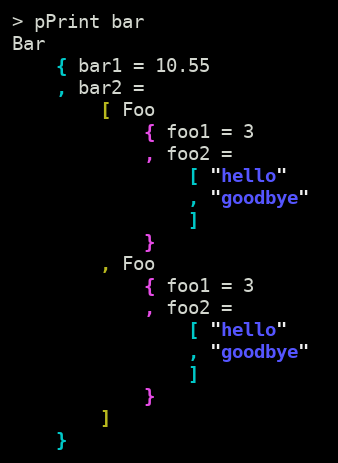
There's a [web app](https://cdepillabout.github.io/pretty-simple) compiled with
GHCJS where you can play around with `pretty-simple` running in your browser.
## Usage
`pretty-simple` can be easily used from `ghci` when debugging.
When using `stack` to run `ghci`, just append the `--package` flag to
the command line to load `pretty-simple`:
```sh
$ stack ghci --package pretty-simple
```
Or, with cabal:
```sh
$ cabal repl --build-depends pretty-simple
```
Once you get a prompt in `ghci`, you can use `import` to get `pretty-simple`'s
[`pPrint`](https://hackage.haskell.org/package/pretty-simple/docs/Text-Pretty-Simple.html#v:pPrint)
function in scope.
```haskell
> import Text.Pretty.Simple (pPrint)
```
You can test out `pPrint` with simple data types like `Maybe` or tuples.
```haskell
> pPrint $ Just ("hello", "goodbye")
Just
( "hello"
, "goodbye"
)
```
## Features
- Easy-to-read
- Complex data types are simple to understand.
- Color
- Prints in color using ANSI escape codes.
- It is possible to print without color by using the
[`pPrintNoColor`](https://hackage.haskell.org/package/pretty-simple/docs/Text-Pretty-Simple.html#v:pPrintNoColor)
function.
- Rainbow Parentheses
- Easy to understand deeply nested data types.
- Configurable
- Indentation, compactness, colors and more are configurable with the
[`pPrintOpt`](https://hackage.haskell.org/package/pretty-simple-1.0.0.6/docs/Text-Pretty-Simple.html#v:pPrintOpt)
function.
- Fast
- No problem pretty-printing data types thousands of lines long.
- Works with any data type with a `Show` instance
- Some common Haskell data types have a `Show` instance that produces
non-valid Haskell code. `pretty-simple` will pretty-print even these
data types.
## Why not `(some other package)`?
Other pretty-printing packages have some combination of these defects:
- No options for printing in color.
- No options for changing the amount of indentation
- Requires every data type to be an instance of some special typeclass (instead
of just `Show`).
- Requires all `Show` instances to output valid Haskell code.
## Other Uses
### Pretty-print all GHCi output
The `pPrint` function can be used as the default output function in GHCi.
All you need to do is run GHCi with a command like one of these:
```sh
$ stack ghci --ghci-options "-interactive-print=Text.Pretty.Simple.pPrint" --package pretty-simple
```
```sh
$ cabal repl --repl-options "-interactive-print=Text.Pretty.Simple.pPrint" --build-depends pretty-simple
```
Now, whenever you make GHCi evaluate an expression, GHCi will pretty-print the
result using `pPrint`! See
[here](https://downloads.haskell.org/%7Eghc/latest/docs/html/users_guide/ghci.html#using-a-custom-interactive-printing-function)
for more info on this neat feature in GHCi.
### Pretty-printing JSON
`pretty-simple` can be used to pretty-print any `String` that is similar to
Haskell data types. The only requirement is that the `String` must correctly
use brackets, parenthese, and braces to indicate nesting.
For example, the
[`pString`](https://hackage.haskell.org/package/pretty-simple/docs/Text-Pretty-Simple.html#v:pString)
function can be used to pretty-print JSON.
Recall our example from before.
```haskell
data Foo = Foo { foo1 :: Integer , foo2 :: [String] } deriving Show
foo :: Foo
foo = Foo 3 ["hello", "goodbye"]
data Bar = Bar { bar1 :: Double , bar2 :: [Foo] } deriving Show
bar :: Bar
bar = Bar 10.55 [foo, foo]
```
You can use [`aeson`](https://hackage.haskell.org/package/aeson) to turn these
data types into JSON. First, you must derive
[`ToJSON`](https://hackage.haskell.org/package/aeson/docs/Data-Aeson.html#t:ToJSON)
instances for the data types. It is easiest to do this with Template Haskell:
```haskell
{-# LANGUAGE TemplateHaskell #-}
$(deriveJSON defaultOptions ''Foo)
$(deriveJSON defaultOptions ''Bar)
```
If you run this in `ghci` and type `encode bar`, you'll get output like this:
```haskell
> import Data.Aeson (encode)
> putLazyByteStringLn $ encode bar
{"bar1":10.55,"bar2":[{"foo1":3,"foo2":["hello","goodbye"]},{"foo1":3,"foo2":["hello","goodbye"]}]}
```
Just like Haskell's normal `print` output, this is pretty hard to read.
`pretty-simple` can be used to pretty-print the JSON-encoded `bar` in an
easy-to-read format:
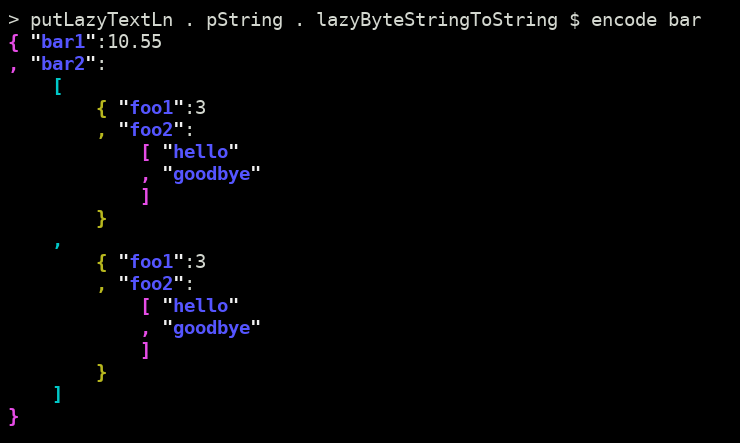
(You can find the `lazyByteStringToString`, `putLazyByteStringLn`,
and `putLazyTextLn` in the [`ExampleJSON.hs`](example/ExampleJSON.hs)
file.)
### Pretty-printing from the command line
`pretty-simple` includes a command line executable that can be used to
pretty-print anything passed in on stdin.
It can be installed to `~/.local/bin/` with the following command.
```sh
$ stack install pretty-simple
```
When run on the command line, you can paste in the Haskell datatype you want to
be formatted, then hit <kbd>Ctrl</kbd>-<kbd>D</kbd>:
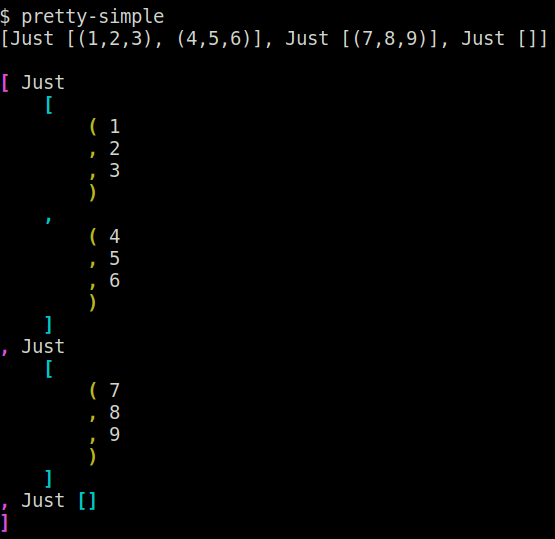
This is very useful if you accidentally print out a Haskell data type with
`print` instead of `pPrint`.
## Contributions
Feel free to open an
[issue](https://github.com/cdepillabout/pretty-simple/issues) or
[PR](https://github.com/cdepillabout/pretty-simple/pulls) for any
bugs/problems/suggestions/improvements.
## Maintainers
- [@cdepillabout](https://github.com/cdepillabout)
- [@georgefst](https://github.com/georgefst)