# Requirements
Install [phoityne-vscode](https://hackage.haskell.org/package/phoityne-vscode) from hackage.
## Especially for GHC8
Install [phoityne-vscode](https://hackage.haskell.org/package/phoityne-vscode) and [haskell-dap](https://hackage.haskell.org/package/haskell-dap).
In the launch.json, add "--with-ghc=haskell-dap" to ghciCmd variable.
```
> stack install phoityne-vscode haskell-dap
```
# Limitations
* The source file extension must be ".hs"
* Can not use STDIN handle while debugging.
* Using GHC7, see the [README](https://github.com/phoityne/hdx4vsc/blob/master/README_ghc7.md).
# Features
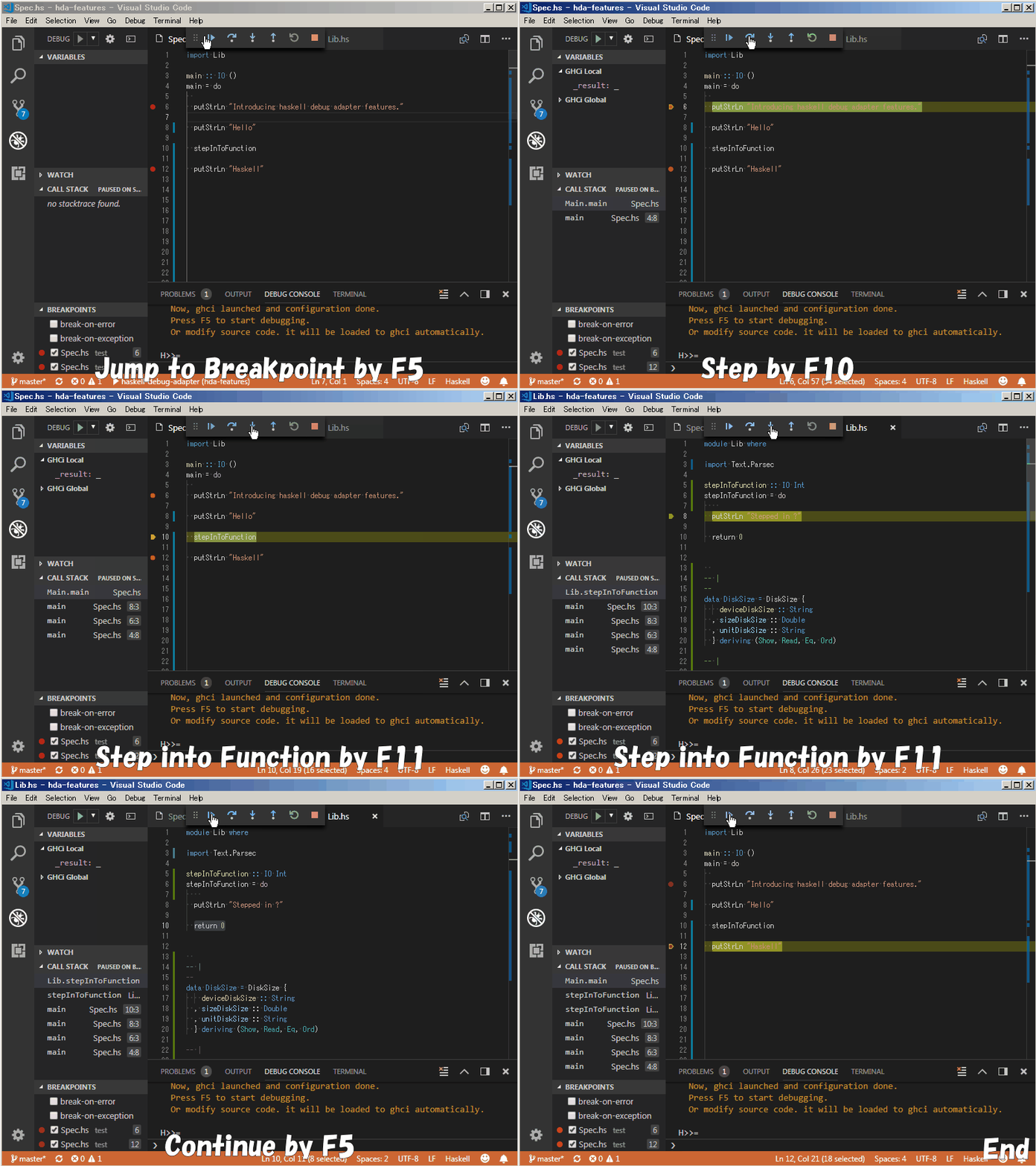
## Continue & Steps
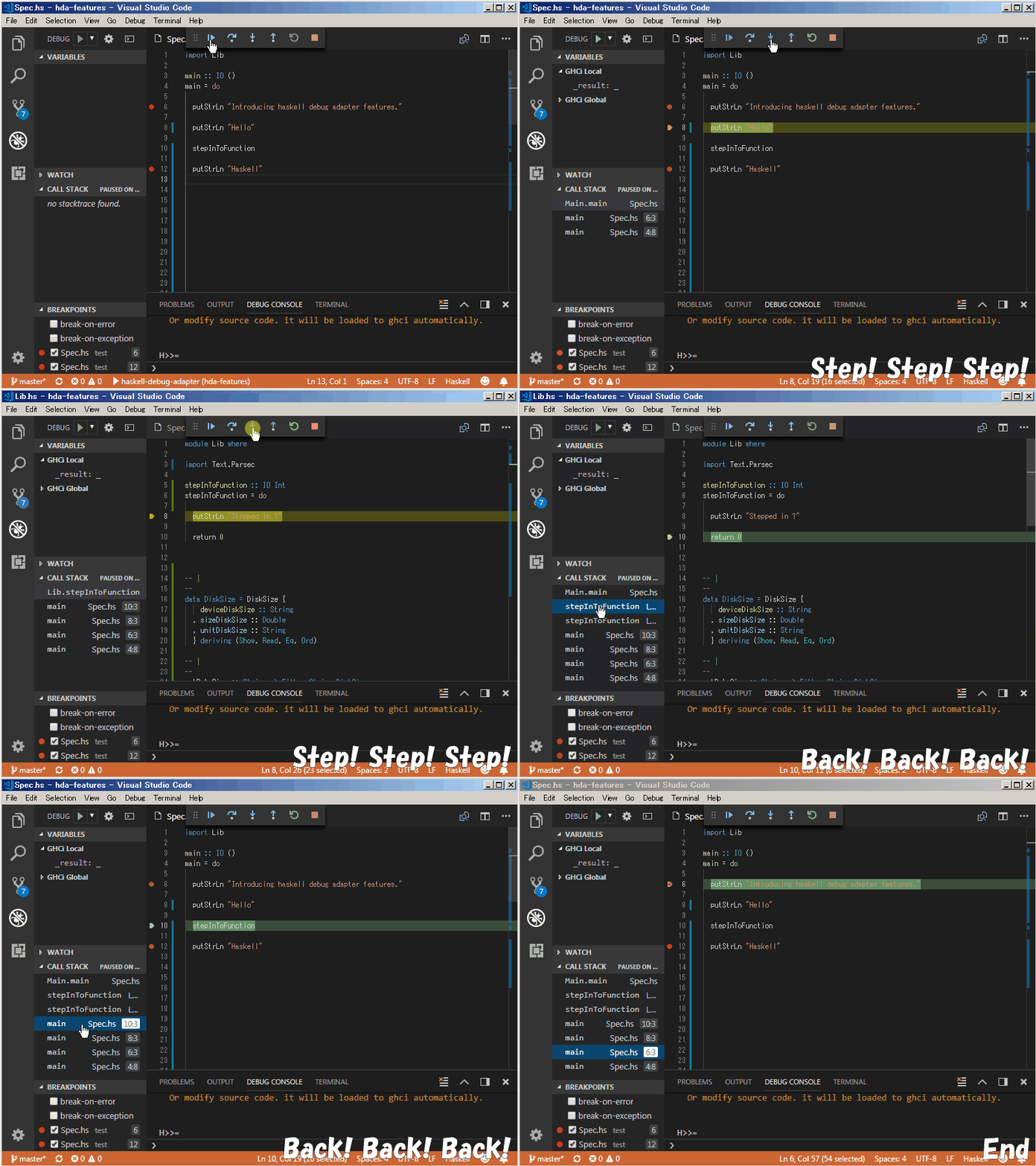
## Stacktrace
The variable added to watch will be forced.
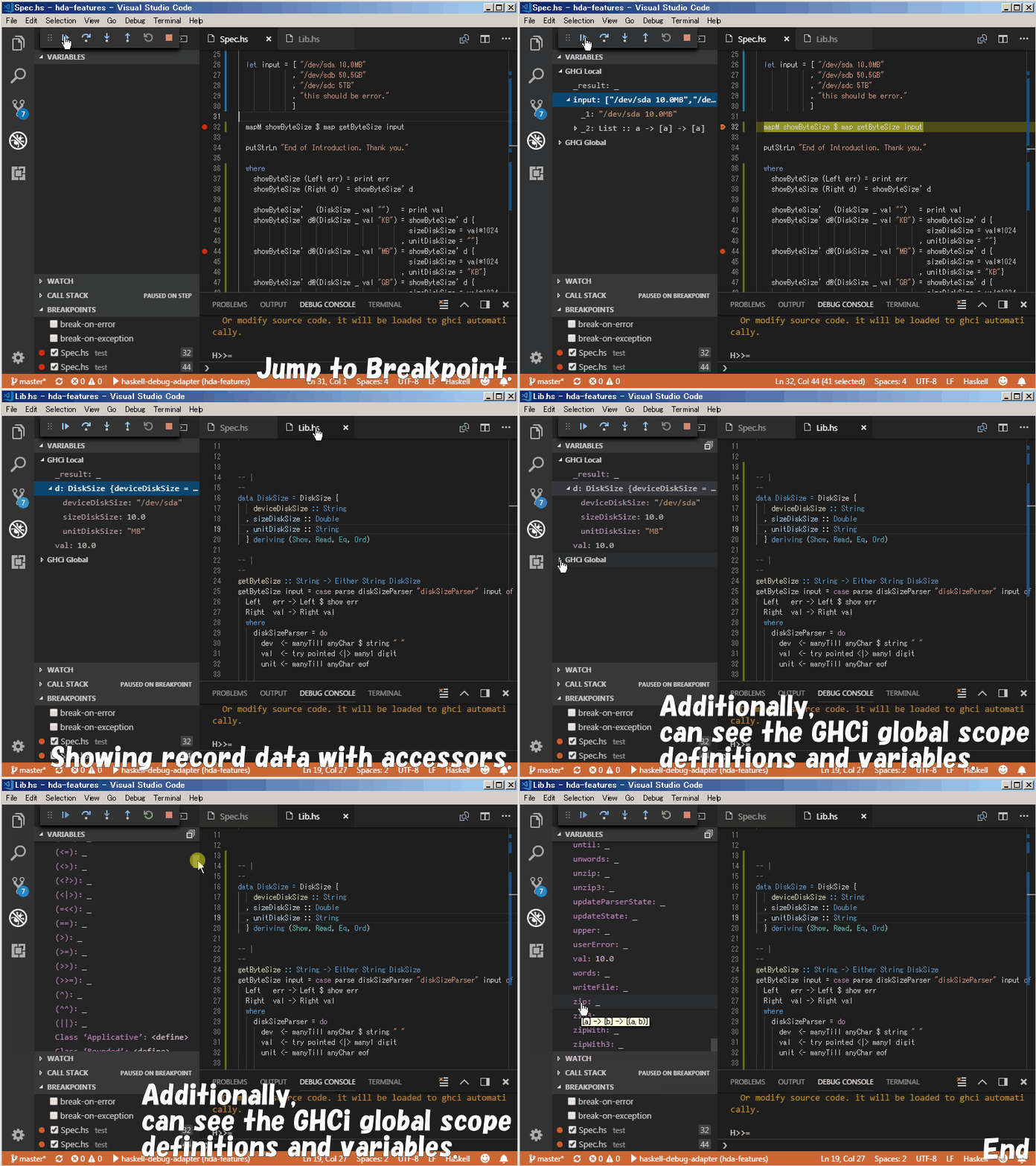
## Bindings
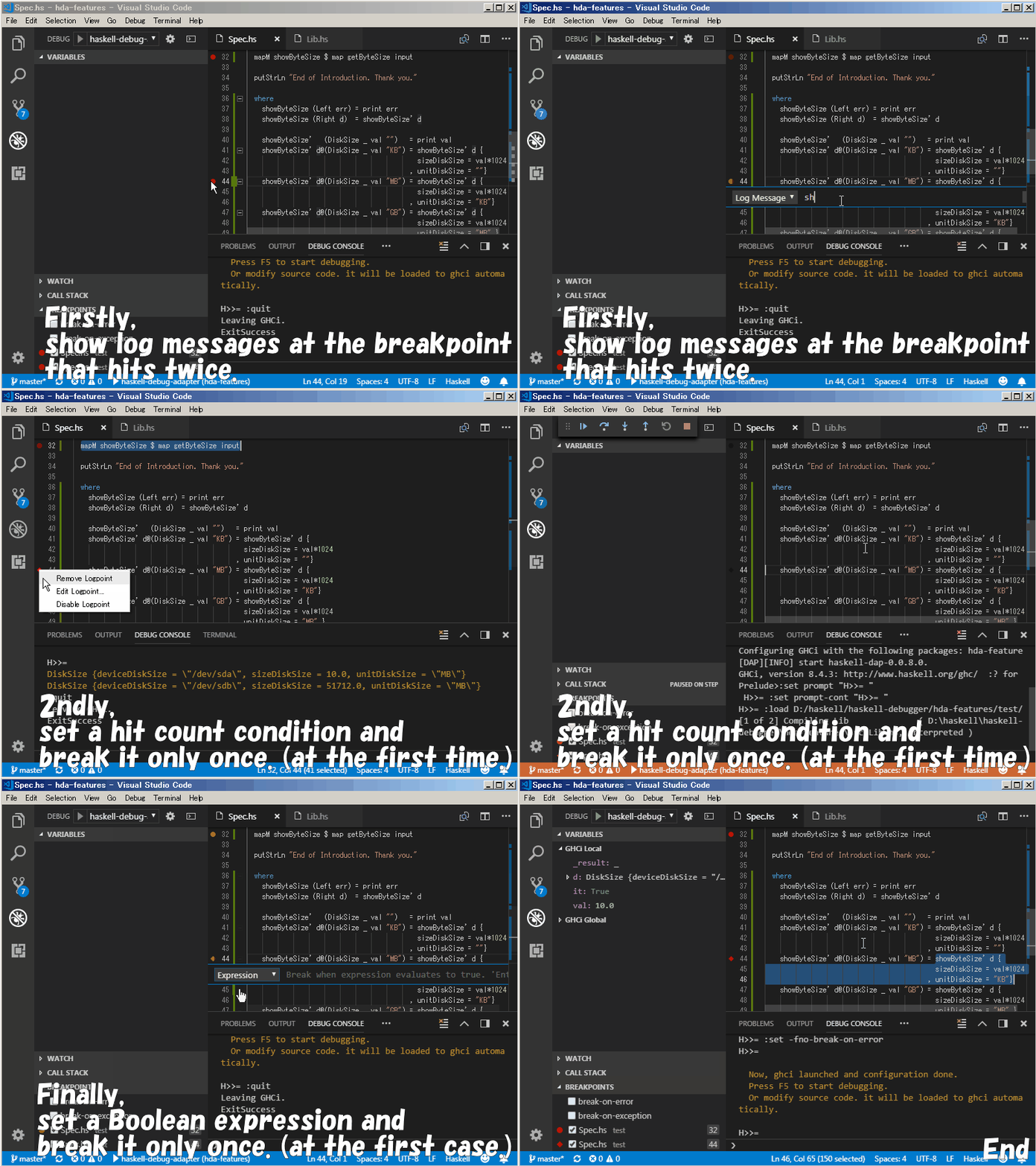
## Break condition
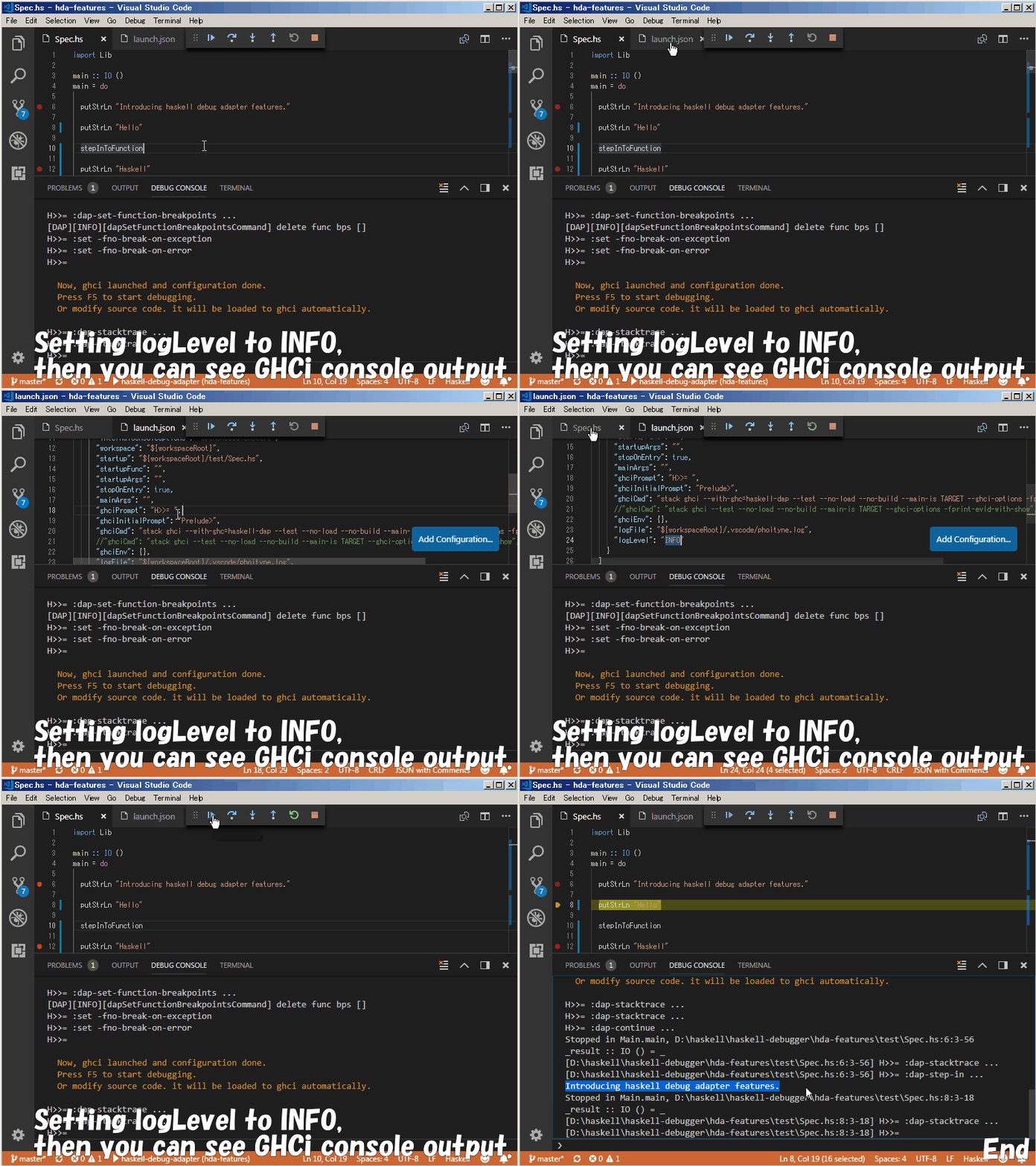
## Console output
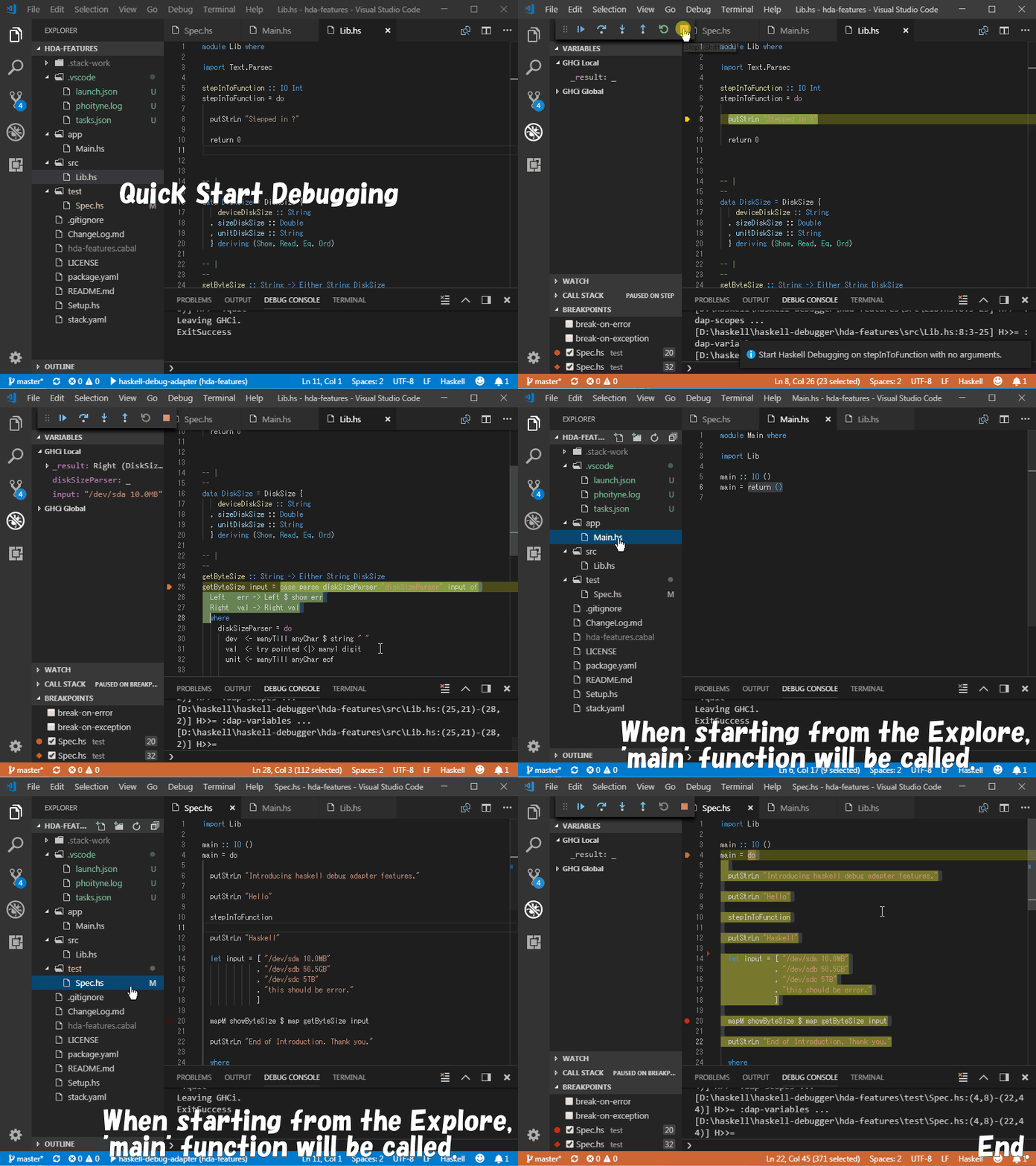
## Quick Start
This is a new experimental feature.
__Note!!__, This function will automatically change the .vscode / launch.json file.
# Shortcut keys
When you start debugging for the first time, .vscode/tasks.json will be created automatically. Then you can use F6, F7, F8 shortcut keys.
* F5 : start debug
* F6 : show command menu (for stack watch)
* Shift + F6 : stop stack watch
* F7 : stack clean & build
* F8 : stack test
* F9 : put a breakpoint on the current line
* Shift + F9 : put a breakpoint on the current column
While debugging, you can use F5, F9, F10, F11 shortcut keys.
* F5 : jump to next bp
* F9 : put bp on the line
* Shift + F9 : put bp on the column
* F10 : step next
* F11 : step into
# Configuration
## __.vscode/launch.json__
|NAME|REQUIRED OR OPTIONAL|DEFAULT SETTING|DESCRIPTION|
|:--|:--:|:--|:--|
|startup|required|${workspaceRoot}/test/Spec.hs|debug startup file, will be loaded automatically.|
|startupFunc|optional|"" (empty string)|debug startup function, will be run instead of main function.|
|startupArgs|optional|"" (empty string)|arguments for startup function. set as string type.|
|ghciCmd|required|stack ghci --test --no-load --no-build --main-is TARGET --ghci-options -fprint-evld-with-show|launch ghci command, must be Prelude module loaded. For example, "ghci -i${workspaceRoot}/src", "cabal exec -- ghci -i${workspaceRoot}/src"|
|ghciPrompt|required|H>>=|ghci command prompt string.|
|ghciInitialPrompt|optional|"Prelude> "|initial pormpt of ghci. set it when using custom prompt. e.g. set in .ghci|
|stopOnEntry|required|true|stop or not after debugger launched.
|mainArgs|optional|"" (empty string)|main arguments.|
|logFile|required|${workspaceRoot}/.vscode/phoityne.log|internal log file.|
|logLevel|required|WARNING|internal log level.|
### changing ghci initial prompt
If you change ghci prompt in .ghci file, or ghci prompt is changed from "Prelude>" by applying _NoImplicitPrelude_ extension, set the initial prompt variable to same prompt string.
% diff .vscode/launch.json.old .vscode/launch.json
19c19
< "ghciInitialPrompt": "Prelude> " // default value.
---
> "ghciInitialPrompt": "> " // e.g.
%
Make sure needs of the last space, and don't forget adding it.
### setting the startup hs file
Set the startup variable to the path of .hs file in which main function is defined.
% diff .vscode/launch.json.old .vscode/launch.json
10c10
< "startup": "${workspaceRoot}/test/Spec.hs", // default value.
---
> "startup": "${workspaceRoot}/app/run.hs", // e.g.
%
### setting the startup function
If you want to run the specific function instead of main function, set the startupFunc variable.
For example, when specifying the following startDebug function,
startDebug :: String -> IO ()
startDebug name = do
putStrLn "hello"
putStrLn name
set the valiavles in the launch.json file.
% diff .vscode/launch.json.old .vscode/launch.json
11c12
< "startupFunc": "", // default value.
< "startupArgs": "", // default value.
---
> "startupFunc": "startDebug", // e.g.
> "startupArgs": "\"phoityne\"", // e.g.
%
### changing log level
For debugging phoityne itself, change the log level to DEBUG.
Adding Issue with the debug log.
% diff .vscode/launch.json.old .vscode/launch.json
12c12
< "logLevel": "WARNING", // default value.
---
> "logLevel": "DEBUG", // e.g.
%
## __.vscode/tasks.json__
|TASK NAME|REQUIRED OR OPTIONAL|DEFAULT SETTING|DESCRIPTION|
|:--|:--:|:--|:--|
|stack build|required|stack build|task definition for F6 shortcut key.|
|stack clean & build|required|stack clean && stack build|task definition for F7 shortcut key.|
|stack test|required|stack test|task definition for F8 shortcut key.|
|stack watch|required|stack build --test --no-run-tests --file-watch|task definition for F6 shortcut key.|
# Thanks
Thank you for your contribution for this project.
* [@hnefatl](https://github.com/hnefatl)