lima-0.2.1.0: README.md
# lima
Convert between files in different formats.
## Related works
- [LiterateMarkdown](https://github.com/haskie-lambda/LiterateMarkdown) - `lima` is a fork of this (abandoned?) project.
- [pandoc](https://www.uv.es/wikibase/doc/cas/pandoc_manual_instalado.wiki?60) - [supports](https://www.uv.es/wikibase/doc/cas/pandoc_manual_instalado.wiki?60) `Literate Haskell` and a ton of other formats.
- [IHaskell](https://github.com/IHaskell/IHaskell) - create `Jupyter` notebooks with `Haskell` code cells and `GitHub Flavored Markdown` text cells and do much more.
- [lhs2tex](https://hackage.haskell.org/package/lhs2tex) - convert `Literate Haskell` to `TeX`.
## Supported formats
- `Haskell` (`.hs`)
- `Literate Haskell` (`.lhs`)
- `GitHub Flavored Markdown` (`.md`)
- `TeX` (`.tex`)
## Demo
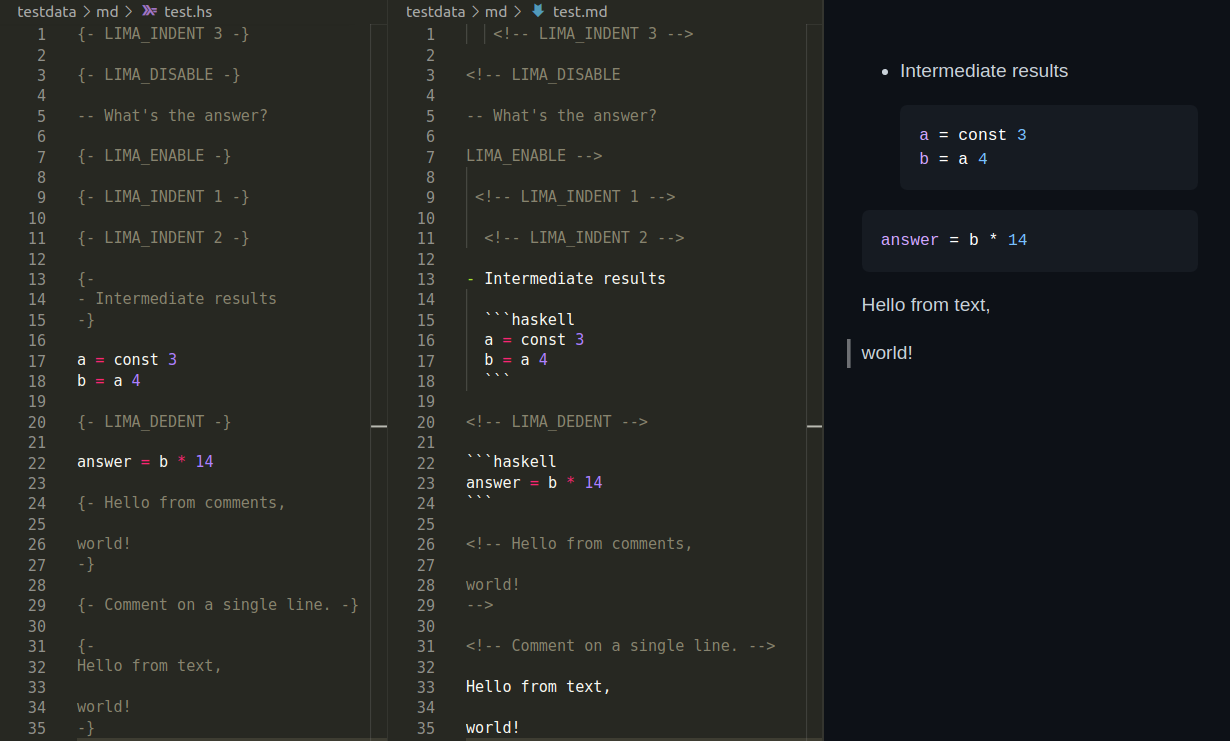
### Markdown
[.hs](./testdata/md/test.hs) and [.md](./testdata/md/test.md)
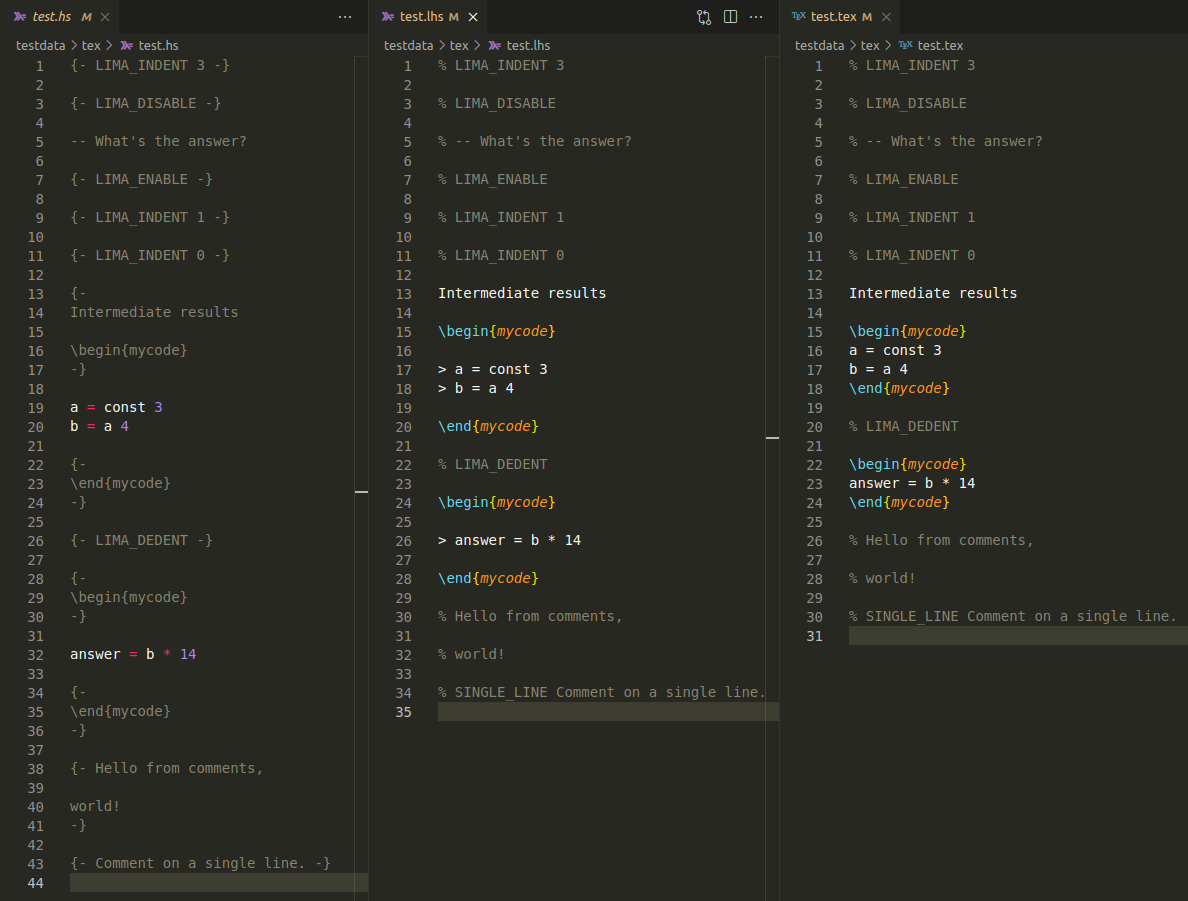
### TeX
[.hs](./testdata/tex/test.hs) and [.lhs](./testdata/tex/test.lhs) and [.tex](./testdata/tex/test.tex)
## Ideas
- I introduced tags into supported formats.
- E.g., in `.hs` files, tags are multiline comments written on a single line like `{- LIMA_ENABLE -}`.
- Tag names are configurable.
- A user may set `on` instead of `LIMA_ENABLE`.
- A document can be parsed into a list of tokens.
- Tags affect how a document is parsed.
- The tokens can be printed back to that document.
- After printing a parsed document back to itself, the document becomes formatted.
- Formatting is idempotent. In other words, formatting the document again won't change its contents.
- The `lima` library provides a parser and a printer for each supported format.
- A composition of a printer after a parser produces a converter.
- Such a converter is usually invertible for two formatted documents.
## Setup
1. Create a test suite.
1. Add `lima` and `text` to its dependencies.
1. Create a test module. It can have the following contents.
<!-- LIMA_INDENT 4 -->
```haskell
import Converter (Format (..), convertTo, def)
import Data.Text.IO qualified as T
main :: IO ()
main = T.readFile "README.hs" >>= T.writeFile "README.md" . (Hs `convertTo` Md) def
```
<!-- LIMA_DEDENT -->
### Example
This package has two such test suites:
- [readme-hs-to-md](test/HsToMd/Main.hs) converts `README.hs` to `README.md`
- [readme-md-to-hs](test/MdToHs/Main.hs) converts `README.md` to `README.hs`
## Workflow
Here's a possible workflow for `Haskell` and `Markdown`:
1. Edit the code in a `README.hs` using [Haskell Language Server](https://github.com/haskell/haskell-language-server).
1. Convert `README.hs` to a `README.md`. Comments from `README.hs` become text in `README.md`.
1. Edit the text in `README.md` using [markdownlint](https://github.com/DavidAnson/markdownlint).
1. Convert `README.md` back to the `README.hs` to keep files in sync. Text in `README.md` becomes comments in `README.hs`.
1. Repeat.
## Contribute
Clone this repo and enter `lima`
```console
git clone https://github.com/deemp/lima
cd lima
```
### cabal
Build
```console
cabal update
cabal build
```
### nix
1. [Install](https://github.com/deemp/flakes/blob/main/README/InstallNix.md) `Nix`.
1. Run a devshell and build `lima` using the project's `cabal`:
```console
nix develop nix-dev/
cabal build
```
1. Optionally, start `VSCodium`:
```console
nix run nix-dev/#writeSettings
nix run nix-dev/#codium .
```
1. Open a `Haskell` file there, hover over a term and wait until `HLS` shows hints.
1. [Troubleshoot](https://github.com/deemp/flakes/blob/main/README/Troubleshooting.md) if necessary.