hvega-0.6.0.0: README.md
# hvega
[](https://vega.github.io/vega-lite/)
Create [Vega-Lite](https://vega.github.io/vega-lite/) visualizations in
Haskell. It targets version 4.5 of the Vega-Lite specification. Note that
the module does not include a viewer for these visualizations (which are
JSON files), but does provide several helper functions, such as
[toHtmlFile](https://hackage.haskell.org/package/hvega/docs/Graphics-Vega-VegaLite.html#v:toHtmlFile),
which create HTML that can be viewed
with a browser to display the visualization. Other approaches include
automatic display in IHaskell notebooks - with the
[ihaskell-vega](https://hackage.haskell.org/package/ihaskell-hvega)
package - or use of external viewers such as
[Vega View](https://hackage.haskell.org/package/vega-view) and
[Vega-Desktop](https://github.com/vega/vega-desktop).
It started off being a copy on an early version (2.2.1) of the
[Elm Vega library](http://package.elm-lang.org/packages/gicentre/elm-vega/2.2.1/VegaLite),
which is released under a BSD3 license by Jo Wood of the giCentre at the
City University of London.
This code is released under the BSD3 license.
## Example
```Haskell
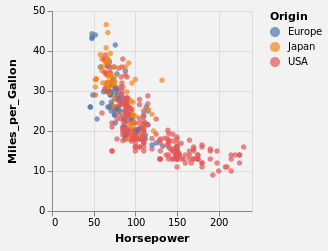
let cars = dataFromUrl "https://vega.github.io/vega-datasets/data/cars.json" []
enc = encoding
. position X [ PName "Horsepower", PmType Quantitative ]
. position Y [ PName "Miles_per_Gallon", PmType Quantitative ]
. color [ MName "Origin", MmType Nominal ]
bkg = background "rgba(0, 0, 0, 0.05)"
in toVegaLite [ bkg, cars, mark Circle [], enc [] ]
```
When viewed with a Vega-Lite aware viewer, the resultant plot is
## Documentation
A tutorial is provided as part of the module: it is based, as is
so much of the module, on the
[Elm Vega walk through](https://github.com/gicentre/elm-vegalite/tree/master/docs/walkthrough).
The tutorial
is [available on hackage](https://hackage.haskell.org/package/hvega/docs/Graphics-Vega-Tutorials-VegaLite.html) - and includes the plot outputs -
and the plots it creates are also available by importing the
`Graphics.Vega.Tutorials.VegaLite` module.
The
[Vega-Lite Example Gallery](https://vega.github.io/vega-lite/examples/) has
been converted to an
[IHaskell notebook](https://github.com/DougBurke/hvega/blob/master/notebooks/VegaLiteGallery.ipynb)
Unfortunately the plots created by VegaEmbed **do not always appear**
in the notebook when viewed with either GitHub's viewer or
[ipynb viewer](http://nbviewer.jupyter.org/github/DougBurke/hvega/blob/master/notebooks/VegaLiteGallery.ipynb),
but things seem much better when using Jupyter Lab (rather than
notebook) to create the notebooks (since Vega is natively
supported in this environment). The notebooks have been re-created
using Jupyter Lab (thanks to Tweag I/O's
[JupyterWith environment](https://www.tweag.io/posts/2019-02-28-jupyter-with.html)), which should make the plots appear on GitHub (you may need
to reload the notebooks as I find they don't display on the
first try).
The [notebooks directory](https://github.com/DougBurke/hvega/tree/master/notebooks)
contains a poorly-curated set of examples and experiments with hvega.
## Differences to Elm Vega
Elm Vega has changed significantly since I started `hvega`, and no-longer
exposes data types directly but uses functions instead: for example,
rather than `PName`, it uses a function like `pName`. It is an open
question whether `hvega` will make the same switch. Over time
the naming of certain operations or data types has diverged between
`hevga` and Elm Vega.
One of the more-obvious changes is that the output of `toVegaLite`
is a separate type from the input values - that is `VegaLite`
and `VLSpec` - since it makes it easier to display the output of
`hvega` in `IHaskell`. The JSON specification is retrieved from
this type with `fromVL`. The `0.5.0.0` release adds some more
type safety (restricting the functions that can be applied
to `encoding` and `transform` for instance).