glirc-2.5: README.md
My IRC client
=============
[](http://travis-ci.org/glguy/irc-core)
Client Features
===============
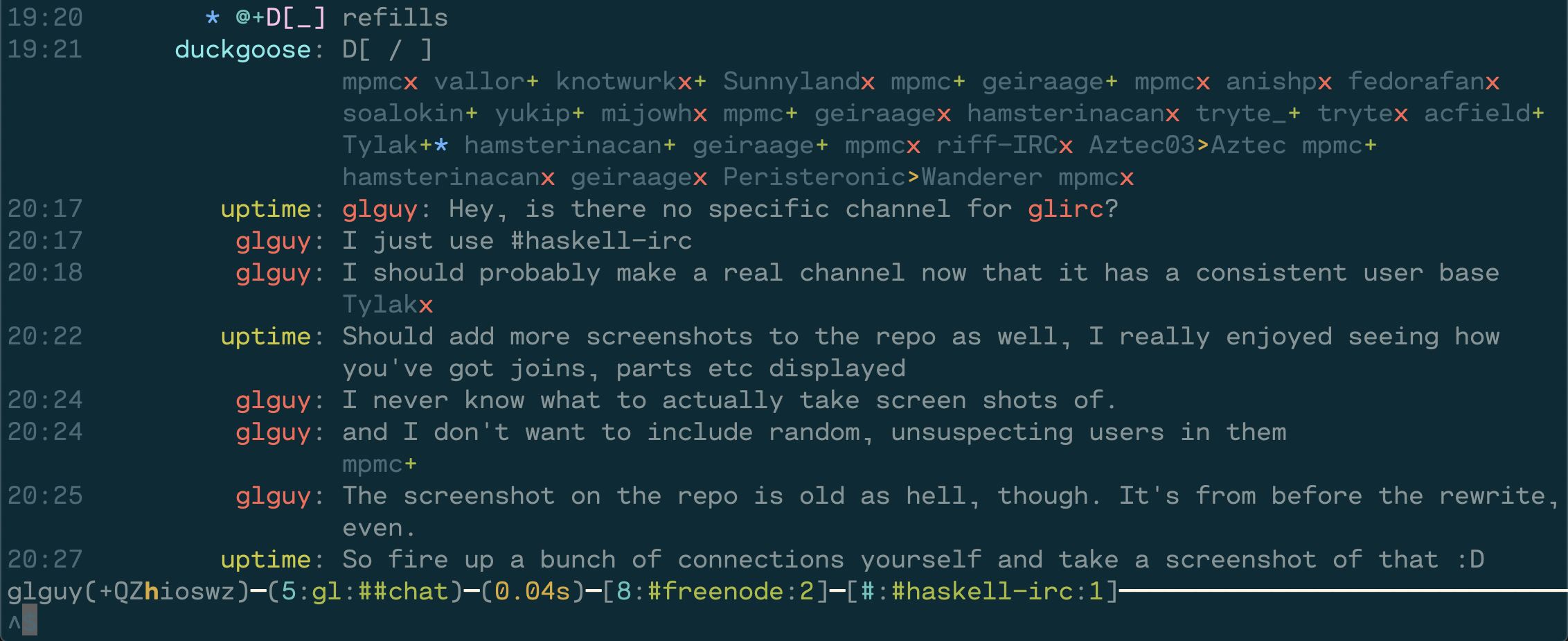
* Subsequent joins and parts fold into one line and do not scroll chat messages off the screen
* Ignore support that folds ignored messages into the joins and parts. Toggle it off to see previously hidden messages
* Detailed view to see all the messages in a channel in full detail with hostmask and timestamp (F2)
* Nick tab completion
* New message notification
* View ban, quiet, invex, and exception lists
* WYSIWYG mIRC formatting input
* Chanserv integration
* Each user's nick is assigned a consistent color, when a user's nick is rendered in a chat message it uses that same color.
* Support for /STATUSMSG/ messages (messages only voice or op users can see)
* Run commands upon connection
* Ban lists don't obstruct chat messages
* Ban list and user list are searchable
* CERTFP and SASL authentication
TLS
===
`glirc` has TLS support via the Haskell `tls` package. Note that Freenode (and other networks) will allow you to authenticate to NickServ via a client certificate.
I use the `x509-store` for decoding certificates and private key files. This library seems to support PEM formatted files and does not seem to support encrypted private key files. If the key and certificate are both contained in the certificate file the private key command line argument is unnecessary.
Startup
=======
```
glirc [FLAGS] INITIAL_NETWORKS...
-c PATH --config=PATH Configuration file path
-h --help Show help
-v --version Show version
```
Environment variables
```
USER=<default nickname and username>
IRCPASSWORD=<your irc password>
```
Configuration file
=================
A configuration file can currently be used to provide some default values instead of
using command line arguments. If any value is missing the default will be used.
Relative paths are relative to the home directory.
Learn more about this file format at [config-value](http://hackage.haskell.org/package/config-value)
```
-- Defaults used when not specified on command line
defaults:
port: 6667
nick: "yournick"
username: "yourusername"
realname: "Your real name"
password: "IRC server password"
tls: yes -- or: no
tls-client-cert: "/path/to/cert.pem"
tls-client-key: "/path/to/cert.key"
-- Override the defaults when connecting to specific servers
servers:
* hostname: "chat.freenode.net"
sasl-username: "someuser"
sasl-password: "somepass"
socks-host: "socks5.example.com"
socks-port: 8080 -- defaults to 1080
* hostname: "example.com"
port: 7000
connect-cmds:
* "JOIN #favoritechannel,#otherchannel"
* "PRIVMSG mybot :another command"
-- Specify additional certificates beyond the system CAs
server-certificates:
* "/path/to/extra/certificate.pem"
palette:
time: [10,10,10] -- RGB values for color for timestamps
nick-colors:
[ cyan, magenta, green, yellow, blue
, bright-cyan, bright-magenta, bright-green, bright-blue
, 218, 88, 89, 124, 160, 205, 212, 224 -- reds
, 94, 130, 166, 172, 208, 214, 216, 180 -- oranges
, 58, 226, 229, 184, 187, 100, 142, 220 -- yellows
, 22, 34, 40, 82, 70, 64, 48, 85 -- greens
, 25, 27, 33, 39, 51, 80, 81, 75 -- blues
, 69, 61, 56, 54, 129, 93, 99, 147 -- purples
]
```
Configuration sections:
--------
* `defaults` - These settings are used for all connections
* `servers` - These settings are used to override defaults when the hostname matches
* `palette` - Client color overrides
Settings
--------
* `hostname` - text - hostname used to connect and to specify the server
* `port` - number - port number, defaults to 6667 without TLS and 6697 with TLS
* `nick` - text - nickname
* `username` - text - username
* `realname` - text - realname / GECOS
* `password` - text - server password
* `sasl-username` - text - SASL username
* `sasl-password` - text - SASL password
* `tls` - yes/no - use TLS to connect
* `tls-insecure` - yes/no - disable certificate validation
* `tls-client-cert` - text - path to TLS client certificate
* `tls-client-key` - text - path to TLS client key
* `connect-cmds` - list of text - raw IRC commands to send upon connection
* `socks-host` - text - hostname of SOCKS proxy to connect through
* `socks-port` - number - port number of SOCKS proxy to connect through
* `server-certificates` - list of text - list of CA certificates to use when validating certificates
* `chanserv-channels` - list of text - list of channels with chanserv op permission
* `flood-penalty` - number - cost in seconds per message
* `flood-threshold` - number - threshold of seconds for burst
* `message-hooks` - list of text - names of hooks to enable
Palette
-------
* `nick-colors` - List of colors - Use for nick highlights
* `time` - color - color for timestamp
* `meta` - color - color for metadata
* `sigil` - color - color for sigils
* `label` - color - color for information labels
* `latency` - color - color for latency time
* `error` - color - color for error messages
* `textbox` - color - color for textbox edges
* `window-name` - color - color for current window name
* `activity` - color - color for activity notification
* `mention` - color - color for mention notification
Commands
========
Client commands
* `/exit` - Terminate the client
* `/quit` - Gracefully terminate connection to the current server
* `/connect <hostname>` - Connect to the given hostname
* `/disconnect` - Forcefully terminate connection to the current server
* `/reconnect` - Reconnect to the current server
Connection commands
* `/nick <nick>` - Change nickname
* `/away <message>` - Set away status
Window management
* `/focus <server>` - Change focus to server window
* `/focus <server> <channel>` - Change focus to channel window
* `/clear` - Clear contents of current window
* `/ignore <nick>` - Toggle ignore of a user
* `/channel <channel>` - Change focus to channel on current network (alias: `/c`)
Channel membership
* `/join <channel>` - Join a channel (alias: `/j`)
* `/part` - Part from current channel
Chat commands
* `/msg <target> <msg>` - Send a message on the current server to target
* `/notice <target> <msg>` - Send a notice message on the current server to target
* `/ctcp <target> <command> <args>` - Send a ctcp command on the current server to target
* `/me <msg>` - Send action message to channel
* `/say <msg>` - Send normal message to channel
Channel management
* `/mode <mode> <params>` - Change modes on the current channel (advanced tab completion)
* `/kick <nick>` - Kick a user
* `/kickban <nick>` - Kick and ban a user
* `/remove` - Gracefully kick a user
* `/topic <topic>` - Change the topic (tab completion for topic)
* `/invite <nick>` - Invite a user to the current channel
Queries
* `/who <query>` - Perform WHO query (use detailed view to see output)
* `/whois <nick>` - Perform WHOIS query
* `/whowas <nick>` - Perform WHOWAS query
* `/ison <nick>` - Perform ISON query
* `/userhost <nick>` - Perform USERHOST query
* `/links <server>` - Perform LINKS query
* `/time` - Perform TIME query
* `/stats <query>` - Perform STATS query
Channel information
* `/users` - Show channel user list
* `/masks <mode>` - Show channel bans(b), quiets(q), exempts(e), or invex(I)
* `/channelinfo` - Show channel topic, creation, url
Window filters
* `/grep` - Filter chat messages using a regular expression
* `/grepi` - Filter chat messages using a case-insensitive regular expression on the message
ZNC-specific
* `/znc <module> <parameters>` - send command to ZNC module without echoing to all clients
* `/znc-playback` - ZNC playback module - play everything
* `/znc-playback <time>` - ZNC playback module - play everything start at the given time today
* `/znc-playback <date> <time>` - ZNC playback module - play everything start at the given time
Low-level
* `/quote <raw command>` - Send a raw IRC command to the server
Keyboard Shortcuts
==================
* `^N` next channel
* `^P` previous channel
* `M-#` jump to window - 1234567890qwertyuiop!@#$%^&*()QWERTYUIOP
* `M-A` jump to activity
* `^A` beginning of line
* `^E` end of line
* `^K` delete to end
* `^U` delete to beginning
* `^D` delete at cursor
* `^W` delete word
* `^Y` paste from yank buffer
* `M-F` forward word
* `M-B` backward word
* `TAB` nickname completion
* `F2` toggle detailed view
* `Page Up` scroll up
* `Page Down` scroll down
* `^B` bold
* `^C` color
* `^V` reverse video
* `^_` underline
* `^]` italic
* `^O` reset formatting
Hooks
=====
buffextras
----------
Enable this hook when using ZNC and the `buffextra` module in order to reinterpret
this module's messages natively in the client.