glirc-2.40.1: README.md
GLIRC - Advanced Console IRC Client
=============
<a href="https://repology.org/project/glirc/versions">
<img src="https://repology.org/badge/vertical-allrepos/glirc.svg?exclude_unsupported=1" alt="Packaging status" align="right">
</a>
* **glirc** [](https://hackage.haskell.org/package/glirc)
* **irc-core** [](https://hackage.haskell.org/package/irc-core)
* **hookup** [](https://hackage.haskell.org/package/hookup)
Client Features
---------------
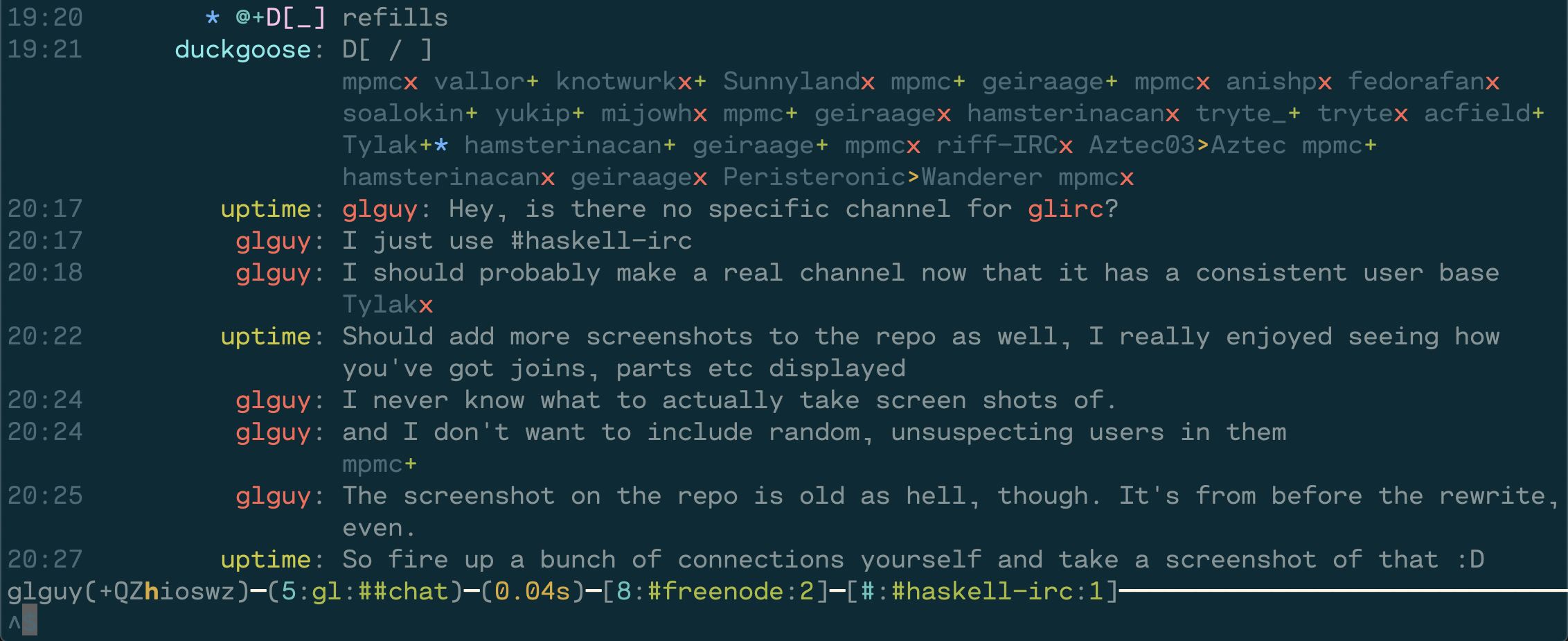
* Support for [a wide variety of IRCv3 capabilities](https://ircv3.net/software/clients#desktop-clients).
* Joins, parts, and quits fold into one line to save space without sacrificing context.
Detailed view (F2) shows additional info, such as part/quit messages.
* Ignore support that folds ignored messages into the joins and parts. Detailed view shows the messages.
* Searchable channel list, who and names list, and list modes (beqI) views separate from chat messages.
* Dynamic, in-place message and list view searching using `/grep`.
* View and open long URLs with `/url`.
* Context-sensitive tab completion and command hints.
* WYSIWYG mIRC formatting input.
* Multi-line editing; Enter sends one line at a time.
* Atheme-flavored-ChanServ integration.
* Nicknames in chat messages are colored to match messages from that nickname.
* Correct handling of [STATUSMSG](https://modern.ircdocs.horse/#statusmsg-parameter), including CTCP ACTIONs.
* Command macros.
* Support for a wide variety of SASL authentication mechanisms, including `ECDSA-NIST256P-CHALLENGE`.
* Split-screen view.
* Configurable color palette.
* Desktop notifications on important messages while unfocused. Can run arbitrary commands instead (or turn them off).
* Extensions, a Lua plugin system, and trivial piping of IRC messages to arbitrary commands with `/exec`.
* Plenty more, but this list is getting a bit long.
Building
========
[](https://github.com/glguy/irc-core/actions/workflows/haskell-ci.yml)
glirc uses recent versions of packages, make sure your package databases are
up-to-date:
```
$ cabal update
```
To install the latest version from Hackage using cabal-install:
```
$ cabal install glirc
```
Building with cabal-install from source checkout
```
$ cabal install --dep
$ cabal build
```
Startup
=======
```
glirc [FLAGS] INITIAL_NETWORKS...
-c PATH --config=PATH Configuration file path
-! --noconnect Disable autoconnecting
-h --help Show help
--config-format Show configuration file format
-v --version Show version
--full-version Show version and versions of all linked Haskell libraries
```
Environment variables
```
USER=<default nickname and username>
IRCPASSWORD=<your irc password>
```
Configuration file
=================
Most of glirc's settings are specified using a configuration file.
The file format is [config-value](http://hackage.haskell.org/package/config-value),
an indentation-sensitive format that resembles YAML.
It has macros which are documented
[here](https://hackage.haskell.org/package/config-value/docs/Config-Macro.html).
The default configuration file path is `~/.config/glirc/config`.
Relative paths are relative to the home directory.
To view the full list of configuration variables,
run `glirc --config-format | less`.
If any variable is unspecified, a default value will be used instead.
```
-- vim: filetype=config-value
-- Grab the Vim syntax highlighting file from the config-value package
-- Defaults used when not specified on command line
defaults:
nick: "yournick"
username: "yourusername"
realname: "Your real name"
tls: yes -- or: no, or: starttls
-- enabling tls automatically uses port 6697
-- Override the defaults when connecting to specific servers
servers:
* name: "libera"
hostname: "irc.libera.chat"
sasl:
username: "someuser"
password: "somepass"
log-dir: "/home/myuser/ircLogs"
connect-cmds:
* "join #glirc,#someotherchannel"
* name: "znc"
hostname: "znc.example.com"
port: 7000 -- Override the default port
password: "IRC server password"
tls-verify: no
message-hooks: ["buffextras"] -- Use this when using ZNC's "buffextra" module to get correct playback
flood-penalty: -1 -- Disable flood controls
flood-threshold: -1
macros:
* name: "wipe"
commands:
* "clear"
* "znc *status clearbuffer $channel"
* name: "mysplits"
commands:
* "splits libera:#haskell libera:#haskell-offtopic"
-- Example use of macro in combination with an extension
* name: "extra"
commands:
* "extension Lua somecommand $network $channel"
extra-highlights: ["glirc", "hello"]
nick-padding:
side: left -- Try "right" if you don't like left padding
width: 13
url-opener: "open" -- This works on macOS; use "xdg-open" for most Linuxes
key-bindings:
* bind: "C-M-b"
command: "masks b"
palette:
line-marker: yellow
time:
fg: [10,10,10] -- RGB values for color for timestamps
bg: blue
identifier-colors: -- Used for nicknames and channel names
[ cyan, magenta, green, yellow, blue
, bright-cyan, bright-magenta, bright-green, bright-blue
, 218, 88, 89, 124, 160, 205, 212, 224 -- reds
, 94, 130, 166, 172, 208, 214, 216, 180 -- oranges
, 58, 226, 229, 184, 187, 100, 142, 220 -- yellows
, 22, 34, 40, 82, 70, 64, 48, 85 -- greens
, 25, 27, 33, 39, 51, 80, 81, 75 -- blues
, 69, 61, 56, 54, 129, 93, 99, 147 -- purples
]
notifications: terminal-notifier -- Use terminal-notifier for nicer notifications (macOS only)
```
Commands
========
glirc has built-in documentation for all of its commands.
To view the full list of commands and what they do, use `/help`.
To view help on a specific command, use `/help <command>`.
Unlike some other clients, glirc does not send unknown commands to the server.
Use `/quote` to send arbitrary IRC commands.
The following is a curated list of commands for basic use:
* `/help [command]` - Show in-client help
* `/exit` - Terminate the client
* `/reload [path]` - Load a new configuration file (optional path)
* `/palette` - Show the client palette
* `/url [n]` - Execute url-opener on the nth URL in the current window (defaults to first)
* `/toggle-activity-bar` - toggle channel names in activity bar
* `/toggle-detail` - toggle full detail view of messages
* `/toggle-metadata` - toggle visibility of channel metadata (joins, parts, quits, nick changes, etc)
Connection
* `/connect <name>` - Connect to the given server
* `/quit [message]` - Gracefully terminate connection to the current server
* `/reconnect` - Reconnect to the current server
* `/nick <nick>` - Change nickname
* `/away [message]` - Set away status; no message removes away status
Window management
* `/windows [filter]` - List all open windows (filters: networks, channels, users)
* `/setname [letter]` - Assign a one-letter name to the given window.
* `/channel <channel>` - Change focus to channel/user on current network (alias: `/c`)
* `/channel <network>:[channel]` - Change focus to channel/user on the specified network (alias: `/c`)
* `/clear [network] [channel]` - Clear contents of current or specified window
* `/splits [focuses...]` - Enable split-screen view. Focuses should be space delimited list of NETWORK:CHANNEL
* `/splits+ [focuses...]` - Incremental addition to splits
* `/splits- [focuses...]` - Incremental removal from splits
* `/toggle-layout` - toggle split-screen layout between 1 and 2 column view
Chat commands
* `/join <channel>` - Join a channel (alias: `/j`)
* `/part [msg]` - Part from current channel
* `/query <target> [msg]` - Switch focus to target window on current server, optionally send message (alias: `/q`)
* `/msg <target> <msg>` - Send a message on the current server to target
* `/me <msg>` - Send action message to channel
* `/say <msg>` - Send normal message to channel; useful for macros and messages starting with a slash
* `/ignore <mask>...` - Toggle ignore status on a list of masks
* `/topic [msg]` - Display or set the current topic of a channel
Views
* `/channelinfo` - Show channel topic, creation, url
* `/grep [flags] <regex>` - Filter using a regular expression
* `/ignore` - Show all ignore masks
* `/list` - View the list of public channels on the network
* `/masks <mode>` - Show channel bans(b), quiets(q), exempts(e), or invex(I)
* `/mentions` - Show all the highlighted lines across all windows
* `/names` - Show the user list for the current channel
* `/who [channel] [options]` - Perform WHO query, sending options to the server, or show the results of the previous query.
ZNC-specific
* `/znc <module> <parameters>` - send command to ZNC module without echoing to all clients
* `/znc-playback` - ZNC playback module - play everything
* `/znc-playback <time>` - ZNC playback module - play everything start at the given time today
* `/znc-playback <date> <time>` - ZNC playback module - play everything start at the given time
Miscellaneous
* `/dump <filename>` - Dump current window to file
* `/extension <extension name> <params...>` - Send the given params to the named extension
* `/exec [-n network] [-c channel] <command> <arguments...>` - Execute a command; if no network or channel are provided send output to client window, if network and channel are provided send output as messages, if network is provided send output as raw IRC messages.
* `/quote <raw command>` - Send a raw IRC command to the server
Keyboard Shortcuts
==================
Note that these keybindings are using *Emacs* syntax. `C-a` means "hold
control and press A". `M-a` means "hold meta key and press A". On most
modern keyboards the *Meta* key is labeled *Alt* or *Option*.
To view the full list of keybindings and what they do,
use `/keymap` from within glirc.
The following is a curated list of default keybinds for basic use:
Navigation
* `Page Up` scroll up
* `Page Down` scroll down
* `C-n` next window
* `C-p` previous window
* `C-x` next network window
* `M-<name>` jump to window with the given one-letter name
* `M-a` jump to activity
* `M-s` jump to previous window
* `ESC` return to messages view (from userlist, masklist, help, etc)
Editing
* `C-b` bold
* `C-c` color
* `C-v` invert foreground/background
* `C-_` underline
* `C-]` italic
* `C-o` reset formatting
* `Tab` autocompletion
* `M-k` replace 2 characters before the cursor with a character specified in `/digraphs`
* `C-a` beginning of line
* `C-e` end of line
* `C-k` delete to end
* `C-u` delete to beginning
* `C-d` delete at cursor
* `C-w` delete word backwards
* `C-y` paste from yank buffer
* `C-t` swap characters at cursor
* `M-f` forward word
* `M-b` backward word
* `M-Right` forward word
* `M-Left` backward word
* `M-Backspace` delete word backwards
* `M-d` delete word forwards
* `M-Enter` insert newline
Client settings
* `F2` toggle detailed view
* `F3` toggle detailed activity bar
* `F4` toggle metadata visibility
* `F7` toggle Enter key lock
Macros
======
The `macros` configuration section allows you to define
sequences of commands. These commands can contain expansions.
Configuration
-------------
* `name` - text - name of macro
* `arguments` - text - space separated list of argument names (suffix name with `?` when optional)
* `commands` - list of text - commands to send after expansion
Macro Expansions
----------------
Variable names and integer indexes can be used when defining commands.
Variables are specified with a leading `$`. For disambiguation a variable
name can be surrounded by `{}`. `$channel` and `${channel}` are
equivalent. Default values can be provided following a pipe: `${var|default}`.
* `channel` - current channel
* `network` - current network name
* `nick` - current nickname
The arguments to a command will be mapped to integer indexes.
* `0` - first argument
* `1` - second argument (etc.)