## Decode/Encode Integers, Words, and IEEE754 and other float formats
On Hackage: http://hackage.haskell.org/package/crackNum
`crackNum` shows you exactly how a number is laid out in memory: the bit
pattern, its fields, the classification, and the value in binary, octal,
decimal, and hex. It works in both directions:
- **Encoding**: give it a value (`2.5`, `-2.3e6`, `NaN`, `0x3.2p5`), and it shows
the bit-pattern it turns into, together with the rounding that took place.
- **Decoding**: give it a bit-pattern (`0xdeadbeef`, `0b0110`, `32'hfdc71fc6`),
and it shows the value it stands for.
### Installation
#### Prebuilt binaries (nothing to build, no Haskell toolchain)
The easiest way to get crackNum is from the
[Releases page](https://github.com/LeventErkok/crackNum/releases). Each bundle is
self-contained: the `crackNum` executable, a copy of `z3`, the graphical interface,
a LICENSE, and a README with the platform-specific details.
| Platform | Asset | Notes |
| --- | --- | --- |
| Linux (x86_64) | `crackNum-<version>-linux-x86_64.tar.gz` | Statically linked, so there is no glibc or distribution requirement: it runs as-is on any x86_64 Linux, old or new. |
| macOS (Apple Silicon) | `crackNum-<version>-macos-arm64.tar.gz` | Includes `CrackNum.app`. Ad-hoc signed rather than notarized, so clear the quarantine flag as the bundled README explains. |
Unpack it and you can run straight out of the directory:
```
$ tar xzf crackNum-3.27-linux-x86_64.tar.gz
$ cd crackNum-3.27-linux-x86_64
$ ./crackNum -fsp 3.5
```
To use it from anywhere, put the files on your `PATH`. `z3` has to be there too,
since crackNum shells out to it for every operation:
```
$ mkdir -p ~/bin && cp crackNum z3 ~/bin/ # on Linux, add crackNum.tcl for the GUI
$ export PATH=$HOME/bin:$PATH # add to your shell rc to make it stick
```
Each bundle's own README covers the platform details — installing `CrackNum.app` on
macOS, and `wish` for the Tcl/Tk GUI on Linux.
#### From Hackage
```
$ cabal install crackNum
```
`crackNum` uses [SBV](http://hackage.haskell.org/package/sbv) and delegates the
actual floating-point reasoning to an SMT solver, so installed this way you also
need [z3](https://github.com/Z3Prover/z3) on your `PATH`. (The prebuilt bundles
above carry their own copy, so there is nothing extra to install.)
### Supported formats
```
Flag Format Exponent Significand
-----------------------------------------------------------------------
-fhp Half precision (IEEE-754 binary16) 5 11
-fbp Brain float (bfloat16) 8 8
-ftf32 TensorFloat-32 8 11
-fsp Single precision (binary32) 8 24
-fdp Double precision (binary64) 11 53
-fqp Quad precision (binary128) 15 113
-fe5m2 FP8, IEEE-754 style 5 3
-fe4m3 FP8, alternate (no infinities) 4 4
-ffp4 FP4 (E2M1) 2 2
-ffp4e0m3 FP4 (E0M3), sign-magnitude 0 3
-fe8m0 E8M0 (MX scale), exponent-only 8 0
-fa+b Arbitrary IEEE-754 float a b
```
Significand sizes include the implicit bit.
FP4 (E0M3) is the odd one out: with no exponent bits at all it is really a 4-bit
sign-magnitude *integer*, holding a sign and a 3-bit magnitude. It covers -7 to 7,
with both a positive and a negative zero, and has neither NaN nor Inf.
E8M0 is the odd one out in the other direction: it is the shared scale of the OCP
Microscaling (MX) formats, and is *all* exponent. With no sign bit and no
significand, every value it holds is a power of two, from 2^-127 to 2^127. It has
no zero and no subnormals -- an all-zero encoding means 2^-127, not zero -- and no
infinities; `0xFF` is its one and only NaN. Negative inputs are rejected, and
values outside its range saturate to the nearest end-point.
Integers come in two flavors: `-iN` for a signed `N`-bit 2's complement integer,
and `-wN` for an unsigned `N`-bit word. Both `N` and the arbitrary float sizes
can be as large as you like, within machine-word limits.
Note that TF32 is cracked as its 19 architectural bits; hardware typically
carries these in a 32-bit container with the remaining bits unused.
Rounding mode is selected with `-r`, and defaults to `RNE` if not given:
`RNE` (nearest, ties to even), `RNA` (nearest, ties away), `RTP` (towards
positive infinity), `RTN` (towards negative infinity), and `RTZ` (towards zero).
### Example: Encode a decimal number as a single-precision IEEE754 number
```
$ crackNum -fsp -- -2.3e6
Satisfiable. Model:
ENCODED = -2300000.0 :: Float
3 2 1 0
1 09876543 21098765432109876543210
S ---E8--- ----------S23----------
Binary layout: 1 10010100 00011000110000110000000
Hex layout: CA0C 6180
Precision: Single
Sign: Negative
Exponent: 21 (Stored: 148, Bias: 127)
Classification: FP_NORMAL
Binary: -0b1.0001100011000011p+21
Octal: -0o1.061414p+21
Decimal: -2300000.0
Hex: -0x2.3186p+20
Rounding mode: RNE: Round nearest ties to even.
Note: Conversion from "-2.3e6" was exact. No rounding happened.
```
### Example: Encode with a different rounding mode
```
$ crackNum -fsp 1.3 -rRTZ
Satisfiable. Model:
ENCODED = 1.3 :: Float
3 2 1 0
1 09876543 21098765432109876543210
S ---E8--- ----------S23----------
Binary layout: 0 01111111 01001100110011001100110
Hex layout: 3FA6 6666
Precision: Single
Sign: Positive
Exponent: 0 (Stored: 127, Bias: 127)
Classification: FP_NORMAL
Binary: 0b1.0100110011001100110011
Octal: 0o1.23146314
Decimal: 1.3
Hex: 0x1.4ccccc
Rounding mode: RTZ: Round towards zero.
Note: Conversion from "1.3" was not faithful. Status: Inexact.
```
### Example: Decode a single-precision IEEE754 number float from memory-layout
```
$ crackNum -fsp 0xfc00 abc1
Satisfiable. Model:
DECODED = -2.6723903e36 :: Float
3 2 1 0
1 09876543 21098765432109876543210
S ---E8--- ----------S23----------
Binary layout: 1 11111000 00000001010101111000001
Hex layout: FC00 ABC1
Precision: Single
Sign: Negative
Exponent: 121 (Stored: 248, Bias: 127)
Classification: FP_NORMAL
Binary: -0b1.00000001010101111000001p+121
Octal: -0o2.00527404p+120
Decimal: -2.6723903e36
Hex: -0x2.02af04p+120
```
### Example: Encode as an E4M3 FP8 float
```
$ crackNum -fe4m3 2.5
Satisfiable. Model:
ENCODED = 2.5 :: E4M3
7 6543 210
S -E4- S3-
Binary layout: 0 1000 010
Hex layout: 42
Precision: 4 exponent bits, 3 significand bits
Sign: Positive
Exponent: 1 (Stored: 8, Bias: 7)
Classification: FP_NORMAL
Binary: 0b1.01p1
Octal: 0o2.4
Decimal: 2.5
Hex: 0x2.8
```
### Example: Decode an FP4 (E2M1) float
```
$ crackNum -ffp4 0b0111
Satisfiable. Model:
DECODED = 6.0 :: FP4
3 21 0
S E2 S
Binary layout: 0 11 1
Hex layout: 7
Precision: 2 exponent bits, 1 significand bit
Sign: Positive
Exponent: 2 (Stored: 3, Bias: 1)
Classification: FP_NORMAL
Binary: 0b1.1p+2
Octal: 0o6
Decimal: 6.0
Hex: 0x6
```
### Example: Decode an FP4 (E0M3) sign-magnitude integer
```
$ crackNum -ffp4e0m3 0b1101
Satisfiable. Model:
DECODED = -5 :: FP4E0M3
3 210
S -M-
Binary layout: 1 101
Hex layout: D
Type: 4-bit sign-magnitude integer
Sign: Negative
Binary: -0b101
Octal: -0o5
Decimal: -5
Hex: -0x5
```
### Example: Encode an FP4 (E0M3) sign-magnitude integer
```
$ crackNum -ffp4e0m3 -- -5
Satisfiable. Model:
ENCODED = -5 :: FP4E0M3
3 210
S -M-
Binary layout: 1 101
Hex layout: D
Type: 4-bit sign-magnitude integer
Sign: Negative
Binary: -0b101
Octal: -0o5
Decimal: -5
Hex: -0x5
Rounding mode: RNE: Round nearest ties to even.
Note: Conversion from "-5" was exact. No rounding happened.
```
### Example: Decode an E8M0 MX scale
```
$ crackNum -fe8m0 0xFE
Satisfiable. Model:
DECODED = 1.7014118346046923e38 :: E8M0
76543210
---E8---
Binary layout: 11111110
Hex layout: FE
Precision: 8 exponent bits, no significand
Sign: Positive (always)
Exponent: 127 (Stored: 254, Bias: 127)
Classification: FP_NORMAL
Binary: 0b1p+127
Octal: 0o2p+126
Decimal: 1.7014118346046923e38
Hex: 0x8p+124
```
### Example: Encode an E8M0 MX scale
Only powers of two are representable, so everything else rounds according to `-r`:
```
$ crackNum -fe8m0 -- 10
Satisfiable. Model:
ENCODED = 8.0 :: E8M0
76543210
---E8---
Binary layout: 10000010
Hex layout: 82
Precision: 8 exponent bits, no significand
Sign: Positive (always)
Exponent: 3 (Stored: 130, Bias: 127)
Classification: FP_NORMAL
Binary: 0b1p+3
Octal: 0o1p+3
Decimal: 8.0
Hex: 0x8
Rounding mode: RNE: Round nearest ties to even.
Note: Original value of 10.0 was rounded to 8.0.
```
### Example: Encode a TensorFloat-32 number
```
$ crackNum -ftf32 2.5
Satisfiable. Model:
ENCODED = 2.5 :: FloatingPoint 8 11
1 0
8 76543210 9876543210
S ---E8--- ---S10----
Binary layout: 0 10000000 0100000000
Hex layout: 2 0100
Precision: 8 exponent bits, 10 significand bits
Sign: Positive
Exponent: 1 (Stored: 128, Bias: 127)
Classification: FP_NORMAL
Binary: 0b1.01p1
Octal: 0o2.4
Decimal: 2.5
Hex: 0x2.8
Rounding mode: RNE: Round nearest ties to even.
Note: Conversion from "2.5" was exact. No rounding happened.
```
### Example: Decode a custom (2+3) float from memory-layout
```
$ crackNum -f2+3 0b10011
Satisfiable. Model:
DECODED = -0.75 :: FloatingPoint 2 3
4 32 10
S E2 S2
Binary layout: 1 00 11
Hex layout: 13
Precision: 2 exponent bits, 2 significand bits
Sign: Negative
Exponent: 0 (Subnormal, with fixed exponent value. Stored: 0, Bias: 1)
Classification: FP_SUBNORMAL
Binary: -0b1.1p-1
Octal: -0o6p-3
Decimal: -0.75
Hex: -0xcp-4
```
### Example: Encode an integer as a 7-bit signed word
```
$ crackNum -i7 12
Satisfiable. Model:
ENCODED = 12 :: IntN 7
654 3210
Binary layout: 000 1100
Hex layout: 0C
Type: Signed 7-bit 2's complement integer
Sign: Positive
Binary: 0b1100
Octal: 0o14
Decimal: 12
Hex: 0xc
```
### Example: Decode a 4-bit unsigned word
```
$ crackNum -w4 0xE
Satisfiable. Model:
DECODED = 14 :: WordN 4
3210
Binary layout: 1110
Hex layout: E
Type: Unsigned 4-bit word
Binary: 0b1110
Octal: 0o16
Decimal: 14
Hex: 0xe
```
### Example: Decode two half-precision floats in two lanes
```
$ crackNum -l2 -fhp 32\'hfdc71fc6
== Lane 1 ============================================================
Satisfiable. Model:
DECODED = NaN :: FloatingPoint 5 11
1 0
5 43210 9876543210
S -E5-- ---S10----
Binary layout: 1 11111 0111000111
Hex layout: FDC7
Precision: Half (5 exponent bits, 10 significand bits.)
Sign: Negative
Exponent: 16 (Stored: 31, Bias: 15)
Classification: FP_NAN (Signaling)
Value: NaN
Note: Representation for NaN's is not unique
== Lane 0 ============================================================
Satisfiable. Model:
DECODED = 0.0075912476 :: FloatingPoint 5 11
1 0
5 43210 9876543210
S -E5-- ---S10----
Binary layout: 0 00111 1111000110
Hex layout: 1FC6
Precision: Half (5 exponent bits, 10 significand bits.)
Sign: Positive
Exponent: -8 (Stored: 7, Bias: 15)
Classification: FP_NORMAL
Binary: 0b1.111100011p-8
Octal: 0o3.706p-9
Decimal: 0.0075912476
Hex: 0x1.f18p-8
```
If you use the verilog notation (`N'h...`), the number of lanes is inferred from
the width, so `-l` is optional in that case.
### Graphical interface (optional)
Optionally, crackNum comes with a GUI: pick a format on the left, type a value,
and see the encoding/decoding in detail. It is entirely optional — crackNum is
fully functional as a command-line tool without it. The GUI is just a thin
front-end that calls the `crackNum` binary underneath, so it supports exactly
the same formats.
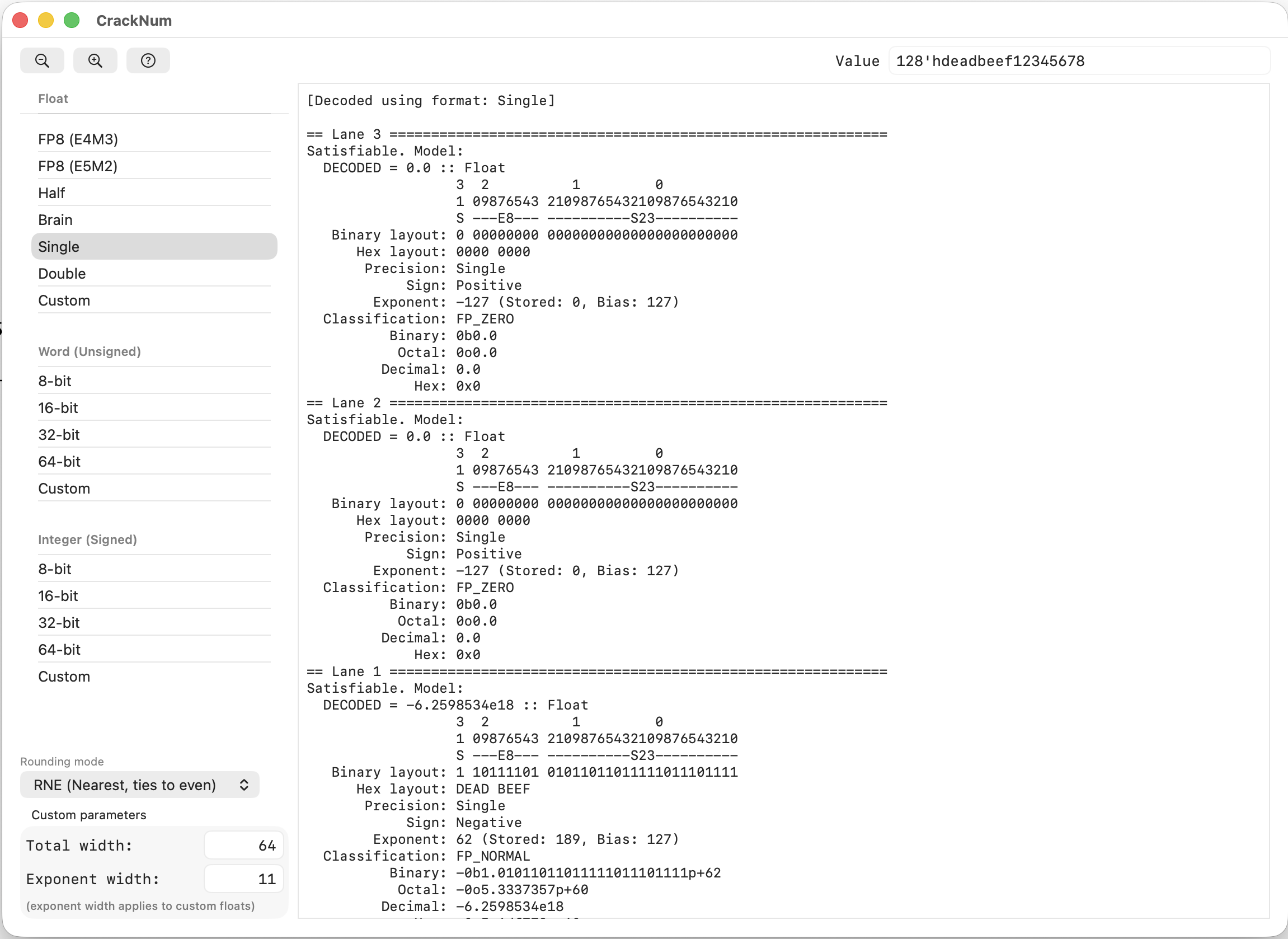
If you installed from a [release bundle](#prebuilt-binaries-nothing-to-build-no-haskell-toolchain)
the GUI is already in it, and there is nothing to build on either platform. The rest
of this section is for installing from Hackage or from a source checkout.
**macOS** — a native Swift/AppKit app (`GUI/swiftGUI/`). It is not part of the
Hackage package, so building it yourself needs a clone of the repository and the
Swift compiler that comes with the Xcode Command Line Tools
(`xcode-select --install`):
```
$ git clone https://github.com/LeventErkok/crackNum.git
$ cd crackNum/GUI/swiftGUI
$ make install # builds CrackNum.app and copies it into /Applications
```
**Linux** — a Tcl/Tk script (`GUI/tclGUI/crackNum.tcl`). The script ships with the
package and is installed alongside the binary, so there is nothing to build; you
only need `wish` (Tk 8.6+):
```
$ nix profile install nixpkgs#tk # or: sudo apt install tk / sudo dnf install tk
```
Then `crackNum --gui` just works. If you want to run a modified copy of the
script, either put it on your PATH as `crackNum.tcl`, or point at it directly
with `CRACKNUM_TCL=/path/to/crackNum.tcl`.
On both platforms, launch the GUI from the command line via the `--gui` option,
which forwards any format/rounding flags and value to the app:
```
$ crackNum --gui -- open the graphical interface
$ crackNum --gui -fsp 2.5 -- open it with single-precision selected, and 2.5 cracked
$ crackNum --gui 0xdeadbeef -- open it pre-filled with a value to decode
```
Bad flags are diagnosed before the GUI comes up: `crackNum -ft32 4 --gui`
reports the unknown format instead of opening an empty window.
### Usage info
```
Usage: crackNum value OR binary/hex-pattern
-i N Signed integer of N-bits
-w N Unsigned integer of N-bits
-f fp Floating point format fp
-r rm Rounding mode to use. If not given, Nearest-ties-to-Even.
-l lanes Number of lanes to decode
-h, -? --help print help, with examples
-v --version print version info
-d --debug debug mode, developers only
--gui launch the graphical interface
--list-formats list the formats supported by -f, one per line
Supported floating-point formats (for use with -f):
hp: Half float ( 5 + 11)
bp: Brain float ( 8 + 8)
tf32: TensorFloat-32 ( 8 + 11)
sp: Single precision ( 8 + 24)
dp: Double precision (11 + 53)
qp: Quad precision (15 + 113)
a+b: Arbitrary IEEE-754 ( a + b)
e5m2: FP8 format (IEEE-754) ( 5 + 3)
e4m3: FP8 format (Alternate) ( 4 + 4)
fp4: FP4 format (E2M1) ( 2 + 2)
fp4e0m3: FP4 format (E0M3) ( 0 + 3)
e8m0: FP8 format (MX scale) ( 8 + 0)
Examples:
Encoding:
crackNum -i4 -- -2 -- encode as 4-bit signed integer
crackNum -w4 2 -- encode as 4-bit unsigned integer
crackNum -f3+4 2.5 -- encode as float with 3 bits exponent, 4 bits significand
crackNum -f3+4 2.5 -rRTZ -- encode as above, but use RTZ rounding mode.
crackNum -fbp 2.5 -- encode as a brain-precision float
crackNum -ftf32 2.5 -- encode as a TensorFloat-32 float
crackNum -fdp 2.5 -- encode as a double-precision float
crackNum -fqp 2.5 -- encode as a quad-precision float
crackNum -fe4m3 2.5 -- encode as an E4M3 FP8 float
crackNum -fe5m2 2.5 -- encode as an E5M2 FP8 float
crackNum -ffp4 2.5 -- encode as an FP4 (E2M1) float
crackNum -ffp4e0m3 3.5 -- encode as an FP4 (E0M3) sign-magnitude integer
crackNum -fe8m0 2.5 -- encode as an E8M0 MX scale (power of two)
crackNum -fsp 0x3.2p5 -- encode as single-precision from hex-float
Decoding:
crackNum -i4 0b0110 -- decode as 4-bit signed integer, from binary
crackNum -w4 0xE -- decode as 4-bit unsigned integer, from hex
crackNum -f3+4 0b0111001 -- decode as float with 3 bits exponent, 4 bits significand
crackNum -fbp 0x000F -- decode as a brain-precision float
crackNum -ftf32 19\'h0000F -- decode as a TensorFloat-32 float
crackNum -fdp 0x8000000000000000 -- decode as a double-precision float
crackNum -fhp 0x8000 -- decode as a half-precision float
crackNum -ffp4 0b0111 -- decode as an FP4 (E2M1) float
crackNum -ffp4e0m3 0b1101 -- decode as an FP4 (E0M3) sign-magnitude integer
crackNum -fe8m0 0x7F -- decode as an E8M0 MX scale (power of two)
crackNum -l4 -fhp 64\'hbdffaaffdc71fc60 -- decode as half-precision float over 4 lanes using verilog notation
GUI:
crackNum --gui -- launch the graphical interface
crackNum --gui 0xdeadbeef -- launch the GUI, pre-filled with the given value
crackNum --gui -fsp 0xdeadbeef -- launch the GUI, using the given format
Notes:
- For encoding:
- Use -- to separate your argument if it's a negative number.
- For floats: You can pass in NaN, Inf, -0, -Inf etc as the argument
along with a decimal (2.3, -4.1e5) or hexadecimal float (0x2.4p3)
- FP4 (E2M1) has neither NaN nor Inf, so those inputs are rejected. Finite
values outside its range of [-6, 6] saturate to the nearest end-point.
- FP4 (E0M3) is a sign-magnitude integer: a sign bit and a 3-bit magnitude,
covering -7 to 7, with both a positive and a negative zero. It has no NaN
and no Inf either, and values outside [-7, 7] saturate to the end-point.
- E8M0 (MX scale) is all exponent: no sign bit and no significand at all,
so every value is a power of two, from 2^-127 to 2^127. It has no zero
and no Inf, and 0xFF is its only NaN. Negative inputs are rejected;
values outside the range saturate to the nearest end-point.
- For decoding:
- Use hexadecimal (0x) binary (0b), or N'h (verilog) notation as input.
Input must have one of these prefixes.
- You can use _,- or space as a digit to improve readability for the pattern to be decoded
- With -lN parameter, you can decode multiple lanes of data.
- If you use verilog input format, then we will infer the number of lanes unless you provide it.
```
VIM users: You can use the http://github.com/LeventErkok/crackNum/blob/master/crackNum.vim file to
use CrackNum directly from VIM. Simply locate your cursor on the text to crack, and use the
command `:CrackNum options`.