# Buck2 build system for Haskell projects
Short summary: this is a [cabal external command][ext] `cabal buck2`
that allows you to use [Buck2](https://buck2.build) as the build
system for your Cabal project.
# Quick start
First [download a buck2
binary](https://buck2.build/docs/getting_started/install/), unpack it
and put it on your `PATH`.
Then
```
cabal install cabal-buck2
```
Then in the root of your project or package:
```
git clone https://github.com/simonmar/haskell-buck2.git buck2
cabal buck2 --enable-tests
```
Then you can use `buck2` as the build tool, e.g.
```
buck2 build //...
```
To build all the components, or
```
buck2 test //...
```
To run your tests.
Note that you need to re-run `cabal buck2 --enable-tests` if you
modify the `cabal.project` or any of the `.cabal` files.
Not all Cabal features are supported - see [limitations](#limitations).
# Why?
(skip this section if you know why you want buck2)
Why might you want to use `buck2` as the build system compared with
just using `cabal`? Well, first off let me be clear that you *still
need Cabal*, because the Buck2 support doesn't know how to solve
package dependencies or build them. So the workflow consists of first
running `cabal buck2` to solve and build the dependencies, but once you've
done that you can switch to `buck2` for building. The idea is that
`buck2` is a more pleasant experience because:
* It's [faster than Cabal, particularly for rebuilds](#performance).
* It supports different build modes out of the box: the default is to
build in `dev` mode (unoptimised with dynamic linking) but adding
`-m opt` gives you optimisation and static linking. Note that Cabal
doesn't have a purely dynamic build mode: it always uses `-dynamic-too`
for libraries, which has a significant built-time performance cost.
* The Buck2 build is extensible. If you have anything that needs to be
generated as part of your build, or any non-standard tooling, then
hooking that up using Buck2 is far easier than Cabal. Furthermore
Buck2 knows how to rebuild things correctly when either the build
system or the code generator components change.
* It works a lot better than Cabal when you have non-Haskell code (e.g. C/C++ or Rust) in your project, because
* Buck2 understands dependencies between C/C++ source files and header files (Cabal doesn't: [issue #4306](https://github.com/haskell/cabal/issues/4306)), so when you modify a C/C++ header the correct things are rebuilt.
* Buck2 builds C/C++ files in parallel, while Cabal doesn't ([issue #7127](https://github.com/haskell/cabal/issues/7127))
* You can use [remote execution and caching](https://buck2.build/docs/users/remote_execution/) (I haven't tried this with `cabal buck2` yet).
Finally, if you have an existing codebase using Buck2 then this is the
basis of something that could "buckify" Cabal packages to integrate
into your build system. It needs a bit of work to be suitable for that
use case, though: `cabal buck2` builds all the external dependencies
and installs them in the Cabal store, whereas to integrate with an
existing build system you would want to satisfy those external
dependencies from the build system itself.
# How complete is it?
I've used it to build a few largish projects, in particular the Cabal
project itself which consists of about 16 packages and a few hundred
source files. It can also build [Glean](https://glean.software), which
has some complex build requirements including custom codegen, FFI &
hsc2hs.
There are a few [limitations](#limitations), however.
# What `cabal buck2` does
You can run `cabal buck2` in a project or a single Cabal package. It
does the following:
1. Solves the `build-depends` constraints of your package(s) and
builds all the dependencies, much like `cabal build all --only-dependencies`
would.
2. Generates some files, notably:
* `BUCK` and `BUCK.cabal.bzl` in each package, these are the Buck2
build targets
* `cabal-buck2/autogen` in each package, this is where we put the
files that Cabal autogenerates, such as `cabal_macros.h` and
`Paths_<pkg>.hs`.
* `third-party/haskell`: tells Buck2 about all the prebuilt package
dependencies, either in the Cabal store or in GHC's package
DB. In here we also record the GHC version you're using, and the
paths to any tool dependencies.
# Buck2 quick start
To build your code:
```
buck2 build //...
```
The `//...` is Buck2's syntax for "all targets recursively below the
current directory". You can also build specific target(s), for example
`buck2 build cabal-install:cabal` would build the `cabal` target in
the `cabal-install` package. For more details see [Target
Pattern](https://buck2.build/docs/concepts/target_pattern/) in the
Buck2 docs.
Next you can run your tests:
```
buck2 test //...
```
# Customising the build
`cabal buck2` will generate all the `BUCK` files if they don't exist,
but you can also write your own if you want (`cabal buck2` won't
overwrite them).
The `BUCK` file usually goes in the same directory as your source
files. The targets that `cabal buck2` produces go in the
`BUCK.cabal.bzl` file, and are generated by a call to
`generated_targets()` from the `BUCK` file. This call takes some
arguments that you can use to override or transform the generated
targets - take a look at the comments in the generated code to see
how.
You can also completely override the generated targets and write a
`BUCK` file with your own rules, while still making use of the
pre-built dependencies that `cabal buck2` produces. For example, the
`BUCK` file for a simple Haskell library might look something like
```
load("//buck2:haskell.bzl", "haskell_library")
haskell_library(
name = "my-package",
srcs = [
"Some/Module.hs",
],
packages = [
"unordered-containers",
],
visibility = ["PUBLIC"],
)
```
and the `BUCK` file for a test might look like
```
load("//buck2:haskell.bzl", "haskell_test")
haskell_test(
name = "my-test",
srcs = {
"Main.hs" : "my-test.hs",
},
deps = [
"//:my-package",
],
packages = [
"test-framework",
"test-framework-hunit",
"HUnit",
],
)
```
You can find docs on how to write `BUCK` files in the Buck2 docs, e.g. [haskell_library](https://buck2.build/docs/prelude/rules/haskell/haskell_library/).
# Build modes
The Buck2 build system has two build modes:
* `dev`: the default, builds everything with `-O0` and dynamic linking. This is intended to give you the quickest edit-compile-test turnaround.
* `opt`: enable `-O` and link statically. This takes longer but the code runs faster.
To build with `opt`, use `-m opt`, e.g.
```
buck2 build my-package:my-program -m opt
```
There are other build options that can be selected in a similar way, such as `-m prof` to enable profiling. See `constraints/BUCK` for details.
# Performance
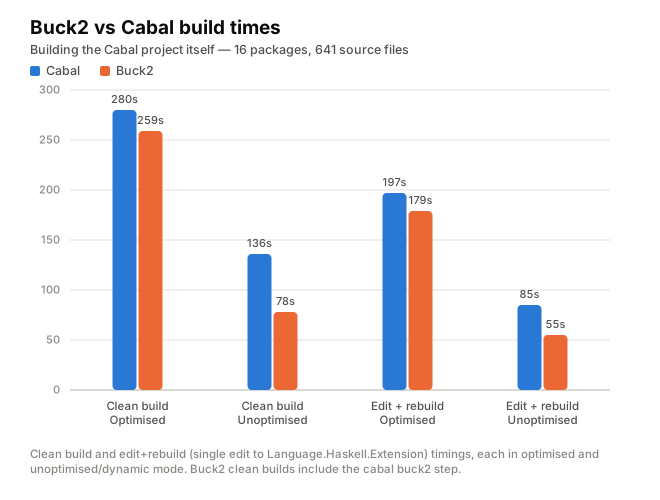
I ran some experiments building the Cabal project itself - 16 packages
and 641 source files (one package, `hackage-security`, is not part of
the project but has to be built locally nonetheless because it depends
on `Cabal-syntax` which *is* part of the project).
Buck2 shines when it comes to rebuilds: the dependency graph is cached
in memory, and it knows when build steps can be omitted because the
inputs haven't changed.
**Caveats**
* Results tend to be +/- a few seconds from run to run
* I didn't dig into the results in any detail
* It's just one set of data points. Different projects and different choices of edits could give different results. However, I did perform a similar
experiment with the [persistent](https://github.com/yesodweb/persistent)
project, and got similar results.
## Raw results and details
### Clean build
* Optimised:
* Default Cabal build: **280s**
* `cabal build all --enable-tests --enable-benchmarks -j`
* Buck2 build (opt mode, including `cabal buck2`): **259s**
* `cabal buck2 --enable-tests --enable-benchmarks && buck2 build //... -m opt`
* Not much difference here, as we expect.
* Unoptimised / dynamic:
* Cabal build with -O0 -dynamic: **136s**
* `cabal build all --enable-tests --enable-benchmarks -j --disable-optimisation --enable-executable-dynamic`
* Buck2 build (dev mode, including `cabal buck2`): **78s**
* `cabal buck2 --enable-tests --enable-benchmarks && buck2 build //... -m dev`
* Cabal is using `-dynamic-too` for libraries, while Buck2 is building everything purely dynamic.
### Edit + rebuild
Next I made a single edit (added an extension to
`Language.Haskell.Extension`) and rebuilt everything:
* Optimised:
* Cabal: **197s**
* Buck2: **179s**
* Unoptimised / dynamic:
* Cabal: **85s**
* Buck2: **55s**
# Limitations
## It's an external command, not builtin to `cabal-install`
This has some implications:
* `cabal` passes only the arguments after `buck2`, so global flags
given before it (`cabal --store-dir=... buck2`) don't reach the
tool. Use the environment (`CABAL_DIR`) instead.
* Nothing checks that your `cabal` binary matches the version of the
`cabal-install` library that `cabal-buck2` was built against. Try to
make sure they match, or confusion will undoubtedly ensue.
## Builds currently use `--make`
The current Buck2 prelude uses `ghc --make` to build each component
(library, executable). Ideally we should expose the full per-module
dependencies to Buck2 so that it can exploit parallelism across
packages for faster builds/rebuilds. It's entirely possible to do
this, indeed the functionality already exists in [Tweag's Haskell/Buck2
integration](https://github.com/tweag/buck2-haskell).
## Custom build type
The `cabal buck2` command doesn't run the actual `Setup.hs` code for a
package with the (legacy) Custom build type. If you rely on this, use
Hooks instead.
## **Template Haskell and `prof`**
A module that defines a splice must live in a *different*
`haskell_library()` from any module that uses it, when profiling (`-m
prof`). If not, the build will likely complain about a link error or a
missing object file at compile-time.
The situation with Template Haskell and profiling is complex, as is
the reason for this limitation.
* Without `-fexternal-interpreter`: GHC loads object code at
compile-time into its own process. Since GHC is itself a
dynamically-linked non-profiled executable, the objects it loads
must be shared, non-profiled, objects. So we have to build all the
dependencies of the current packages as shared libraries. This is
fine, except for the current package: GHC expects to find the
`.dyn_o` objects for the current package in the current `-odir`. But
Buck2 doesn't work this way: it builds the two instances of the
package separately. It's not clear if this is easily fixable.
* With `-fexternal-interpreter`, we could load the profiled non-shared
objects. However, this method uses the RTS runtime linker, which is
known to have some limitations and can't load some objects,
particularly on certain architectures. This is the main reason that
GHC switched to dynamic linking. So we don't go this route.
## No support for Cabal's `foreign-library`
Nothing fundamental blocking this, it's just a TODO.
## Preprocessors like `hspec-discover`
The `hspec-discover` preprocessor is designed to be invoked by GHC via
the `-pgmF` flag to specify a custom preprocessor. The problem is that
`hspec-discover` searches the filesystem to find other source files;
these other source files amount to implicit inputs to the compilation,
but when using Buck2 all inputs must be explicit (this is so that
compilation steps can be executed remotely).
To build an `hspec-discover` test with Buck2, you have to run the
preprocessor using a `genrule()` that takes all the source files as an
input. For example, if your test is in `test/Spec.hs`:
```
filegroup(
name = "srcs",
srcs = glob(["**/*.hs"])
)
genrule(
name = 'spec-gen',
cmd = "$(location third-party-haskell//:hspec-discover-exe) $(location :srcs)/test/Spec.hs test/Spec.hs ${OUT}",
out = "test/Spec.hs"
)
haskell_test(
name = 'spec',
srcs = {
'Main.hs': ':spec-gen',
...
},
...
)
```
# Acknowledgments
Most of the code and modifications to the standard Buck2 prelude were
developed with the help of Claude Code using Claude Sonnet 5/5.5.
The Haskell support already in the Buck2 prelude was developed by Meta
and is in production use internally for building
[Glean](https://glean.software). This project just fixes a few things
and adds some functionality needed to support building Cabal projects.
# Related projects
[Tweag](https://tweag.io) also worked on a [Haskell integration for
Buck2](https://www.youtube.com/watch?v=bbFnrTAIK9Q). This project has
no code in common with theirs, except for the shared upstream prelude
code. Tweag's integration is more sophisticated and was aimed at using
Buck2's improved scalability to build large Haskell projects.
[ext]: https://cabal.readthedocs.io/en/stable/external-commands.html