ansi-terminal
=============
A Haskell package providing support for 'ANSI' control character sequences for
terminals on Unix-like operating systems and Windows
Description
-----------
['ANSI' terminal escape code](http://en.wikipedia.org/wiki/ANSI_escape_sequences)
support for Haskell, which allows:
- Colored text output, with control over both foreground and background
colors
- Clearing parts of a line or the screen
- Hiding or showing the cursor
- Moving the cursor around
- Reporting the position of the cursor
- Scrolling the screen up or down
- Changing the title of the terminal
By using emulation, it is compatible with versions of 'Command Prompt' and
'PowerShell' on Windows that did not recognise 'ANSI' escape codes before
Windows 10 version 1511 was released in November 2015.
If you like this, you may be interested in
[ansi-wl-pprint](http://github.com/batterseapower/ansi-wl-pprint), which
provides a pretty-printer that can construct strings containing 'ANSI'
colorisation.
Not all 'ANSI' escape codes are suported by this library but most (if not
all) of the popular ones that are well-supported by terminal software are,
including:
- Select Graphic Rendition mode (colors and other attributes): `setSGR`
- Clearing parts of the screen: `clearFromCursorToScreenEnd`,
`clearFromCursorToScreenBeginning`, `clearScreen`,
`clearFromCursorToLineEnd`, `clearFromCursorToLineBeginning` and
`clearLine`
- Cursor visibility changes: `hideCursor` and `showCursor`
- Cursor movement by character: `cursorUp`, `cursorDown`, `cursorForward` and
`cursorBackward`
- Cursor movement by line: `cursorUpLine` and `cursorDownLine`
- Directly changing cursor position: `setCursorColumn` and `setCursorPosition`
- Saving, restoring and reporting cursor position: `saveCursor`,
`restoreCursor` and `reportCursorPosition`
- Scrolling the screen: `scrollPageUp` and `scrollPageDown`
- Changing the title: `setTitle`
Each supported escape code or family of codes has a corresponding
function that comes in three variants:
- A straight `IO` variant that doesn't take a `Handle` and just applies the
escape code to `stdout` and any terminal attached to it
- An `IO` variant similar to above, but which takes a `Handle` to which the
escape code should be applied
- A `String` variant that returns a literal string that should be
included to get the effect of the code. However, on Windows systems where
emulation has been necessary, these strings will always be blank!
Example
-------
A full example is
[available](http://github.com/feuerbach/ansi-terminal/tree/master/System/Console/ANSI/Example.hs),
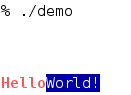
but for a taste of how the library works try the following code:
``` haskell
import System.Console.ANSI
main = do
setCursorPosition 5 0
setTitle "ANSI Terminal Short Example"
setSGR [ SetConsoleIntensity BoldIntensity
, SetColor Foreground Vivid Red
]
putStr "Hello"
setSGR [ SetConsoleIntensity NormalIntensity
, SetColor Foreground Vivid White
, SetColor Background Dull Blue
]
putStrLn "World!"
```
Documentation
-------------
Haddock documentation is [available at
Hackage](http://hackage.haskell.org/packages/archive/ansi-terminal/latest/doc/html/System-Console-ANSI.html).
Credits
-------
The library is originally written by [Max Bolingbroke](https://github.com/batterseapower)
Maintainers
-----------
[Mike Pilgrem](https://github.com/mpilgrem) and [Roman Cheplyaka](https://github.com/feuerbach) are the primary maintainers.
[Oliver Charles](https://github.com/ocharles) is the backup maintainer. Please
get in touch with him if the primary maintainers cannot be reached.